It has come to my attention that people are not noticing this amazing app that is being produced for Android to give full missionplanner functionality and more using Mavlink to your UNMODIFIED android device
Features: Follow Me (If you device has GPS, you can set your plane or copter to follow me and it will circle or hover above your point or trail behind you as you run for it :)
Parameters (Droidplanner has a Parameters screen which allows you to correct your parameters in flight from your android device, no laptops to lug around!
Accelerometer Calibration Droidplanner has Horizon calibration to allow you to calibrate your copter in the field, which can be a life saver if you go miles to fly and find the horizon is off.)
Flightpath Planning Droidplanner Offers the ability to program your way points onto google maps with options for default altitude and more, it is very user friendly and works well!
Remote control Aircraft from app. (This app has a very special feature which allows you to Control your model from the app using a touch screen interface, this means if something went wrong and you could not use your controller, or you have a friend who wants to try flying but do not have a buddy system, you can use this feature to control your Model!)
Remote control Camera Gimble (A feature unique to Droid planner allows you to control a camera gimple plugged into the apm from the App, this means rather than buying two controllers or modifying your controller to add extra control for the camera, simply switch to camera control and you have full ability to adjust the camera position as you like.)
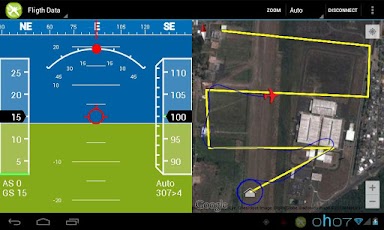
Live Horizon and Map view with telemetry data Switch to the flight data Tab and have full telemetry view with vocal alerts, Altitude Number of sattelites, position shown on map, Airspeed and ground speed, level and more.
These are some of the Prominent features of Droid planner, but there is so much more!.
If you want to know how to connect the MAVlink dongle to your android device it is very simple, you need to buy a chep usb to micro usb (depending on your device) adpater from somewhere like ebay or amazon, plug the one end into android device, the other into the MAV link and thats it!
Check it out, completely FREE
https://play.google.com/store/apps/details?id=com.droidplanner
(update by mh)
You need aUSB OTG cable.
List of compatible Android devices.
(end update)

Comments
Thanks for your quick answer.
Well, droidplanner works with my cell which is Android 4.0.4.
I´ll try Andropilot in a minute
Hi Folks,
if i start droidplanner with Android 4.2.2 it just shuts down.
Any clues ?
thanks in advance
fred
Thanks, Kevin.
That's the kind of info I am looking for. I'd appreciate the contact info.
Michael
Arthur,
I own a Titan Tornado II (Experimental) airplane. There are many like me who would like a HUD as part of a glass cockpit. They start in the thousands of $ and keep climbing. I have been amazed by the range of telemetry that comes with the Windows version, including wind speed and direction (with the pitot module). I would like to put the APM 2.5 with pitot module in my plane and use it to provide telemetry to, and power, a tablet. There are free Android moving maps programs like Avare (Av Air) that let me see where I am. Your work can let me see how I'm doing in 3D space.
I am particularly interested in the USB cable, because a powered USB connection would let me attach my Nexus 7 to my dash, plug it into a powered USB port that also provides the telemetry, and toggle between your program and the moving maps. It would be even better if I could use Avare on one side, and the HUD on the other.
I would like to make this kind of information available to thousands of experimental pilots who can benefit from this inexpensive source of accurate telemetry.
Michael
t my software, i helped with some artwork, Arther brenneman is the brains behind this amazing app, however I can still help, Firstly droid planner does not have usb support is it mavlink only.
Just find a usb to nexus 7 port and it should be fine
Jared,
Two questions:
1. I own an Asus Transformer Pad TF700T connected to the mobile dock, which has one USB port that acts as a host controller. Droid Planner does not seem to recognize my newly purchased APM 2.5 when I plug it into the USB. Andro Pilot does recognize the APM. Any thoughts how I can make my tablet work with yours?
2. I also own a Nexus 7. Do you know what USB host adapter will work with the APM and your software?
Thanks, Michael
I'm flying (in this case) a quadcopter, roll, throttle and yaw (I think) are correct, just pitch was reversed. The controls are also very sensitive although there's obviously limited real estate on an android screen for large movements, (I'm using a 5.3" Galaxy Note). Thanks again, this is great, I really like the 'navigate to vehicle' option to recover it if it goes down.
Very nice Arthur, two very minor things I noticed: in Settings>Flight Data> Fligth path size.
In the RC control, my pitch is reversed, any way to change that?
you need to buy a cheap usb to micro usb (depending on your device) adpater from somewhere like ebay or amazon, plug the one end into android device, the other into the MAV link and thats it!
basically yes any android device, phone or tablet running android 4+ usb adapter if the tablet does not have usb and mavlink
Cannot get Droidplanner to connect to my generic Amaze 4.?? tablet. It just says APM not connected when I connect the working OTG cable to my 3DR radio. I know the OTG cable works as I successfully mounted a USB device. The radio works as it connects via my laptop fine.
Is there a driver I need to install on the tablet?
-
2
-
3
-
4
-
5
-
6
of 6 Next