It has come to my attention that people are not noticing this amazing app that is being produced for Android to give full missionplanner functionality and more using Mavlink to your UNMODIFIED android device
Features: Follow Me (If you device has GPS, you can set your plane or copter to follow me and it will circle or hover above your point or trail behind you as you run for it :)
Parameters (Droidplanner has a Parameters screen which allows you to correct your parameters in flight from your android device, no laptops to lug around!
Accelerometer Calibration Droidplanner has Horizon calibration to allow you to calibrate your copter in the field, which can be a life saver if you go miles to fly and find the horizon is off.)
Flightpath Planning Droidplanner Offers the ability to program your way points onto google maps with options for default altitude and more, it is very user friendly and works well!
Remote control Aircraft from app. (This app has a very special feature which allows you to Control your model from the app using a touch screen interface, this means if something went wrong and you could not use your controller, or you have a friend who wants to try flying but do not have a buddy system, you can use this feature to control your Model!)
Remote control Camera Gimble (A feature unique to Droid planner allows you to control a camera gimple plugged into the apm from the App, this means rather than buying two controllers or modifying your controller to add extra control for the camera, simply switch to camera control and you have full ability to adjust the camera position as you like.)
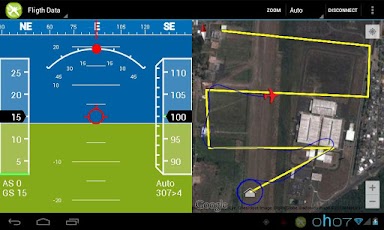
Live Horizon and Map view with telemetry data Switch to the flight data Tab and have full telemetry view with vocal alerts, Altitude Number of sattelites, position shown on map, Airspeed and ground speed, level and more.
These are some of the Prominent features of Droid planner, but there is so much more!.
If you want to know how to connect the MAVlink dongle to your android device it is very simple, you need to buy a chep usb to micro usb (depending on your device) adpater from somewhere like ebay or amazon, plug the one end into android device, the other into the MAV link and thats it!
Check it out, completely FREE
https://play.google.com/store/apps/details?id=com.droidplanner
(update by mh)
You need aUSB OTG cable.
List of compatible Android devices.
(end update)

Comments
Hello, I just buy a Nexus7 2013 but it doesn't connect, Is not compatible perhaps?
Thanks for this amazing app Arthur!
Hi,
just solved the problem ;)
I didn't know that the telemetrie module has to be plugged in to start the application.
Hi Arthur,
yes, I can open the Google Maps app.
(I send you a friend request)
I don't manage to get DroidPlanner to run on my tablet, I have a Samsung GT-P3100. According to the download page it should work. I managed to install it, but if I try to run the application I get a "Unfortunately, DroidPlanner has stopped" message.
@ Arthur B.
I've have these: VID_10C4&PID_EA60\0001
It'll be great to get them working with DP, got them for less than $8 a pair. Thanks.
@leopoldo
I believe Apple does not allow remote control / drone control apps into the store. All ipad apps are OSS and require everyone to build and install the app using a developer account using their mac.
I'm unable to connect droidplanner to apm using APC220 but I can connect using xbees. I can also connect mission planner to apm using either xbees or APC220. Am I missing something?
Hi Arthur
So after spending the entire weekend messing around and it not working for me, I tried it again now, and what do you know - It works! Great work with this project. thank you for all your efforts! I will be testing my Y6 this weekend , cannot wait to try follow me, and the first waypoint missions. wish me Luck.
PS. I have asked for both DriodPlanner and AndroPilot Categories to be created, should happen soon
By the way, why is there no DROIDPLANNER category in the forums? Surely that would be a better place for support queries like mine?
-
1
-
2
-
3
-
4
-
5
of 6 Next