gcs (2)

SKELLIT - Modular mission control system

11029197873?profile=RESIZE_710xSKELLIT is a family of wearable, hand-held, console- and deskmount solutions for tablets and smartphones, all based on the same extremely compact active docking technology. Your tablet just snaps into the secure application specific frame, and it can be removed using only two fingers, while it will never come loose from any other force or impact.

Active docking also means instant connection to peripherals like a gamepad or wired LAN and, of course, an external power source. It is essential to anyone using their mobile device regularly for professional purposes, especially outdoors.

11029198284?profile=RESIZE_710xWe can't always choose the operator location and other conditions of drone missions. That's where such modularity really comes in handy. For most quick flights you can keep the tablet docked in the handheld set with the RF module snapped onto its back. However, if you want to stay seated in your car for a longer mission, the docking RF module can go on the roof, and you're comfortably holding just a handheld unit.

11029198872?profile=RESIZE_710xOnce you have to hike to your launch point or have to access the controller frequently during the day, a wearable set is the most comfortable solution. Mounting the flat RF box on your shoulder or on a backpack, and only having to hold a small rugged controller keeps everything light for you on the job.

11029199095?profile=RESIZE_710xSome of you may have seen our earlier mission control stations, or our various other sUAS system integrations. We've been developing products for all areas of the UAV-USV field for well over a decade now. Most of our customers want rugged IP54-68 grade gear from us, so that's what we do.

11029201090?profile=RESIZE_710xThe other main equipment feature we concentrate on is portability, which may mean quick field assembly from compact and light modules, or just lean and mean self-contained and instantly usable systems. While we've always tried to design most of our hand-held mission controls with at least some level of wearability in mind, our latest SKELLIT product line surely provides the pinnacle of this feature.

11029203076?profile=RESIZE_710xSKELLIT Protean is the full UAV-USV controller package for any given industrial tablet, which may include any combination, or in fact all of these modules:

SKELLIT HH - the handheld controller unit with 2-4 joysticks, 2 toggles and 6-8 pushbuttons

SKELLIT RF - snaps right onto the back of the HH or on the tripod adapter, with a long range digital IP datalink RF module inside, i.e. Microhard, Silvus, Doodle Labs, etc.

SKELLIT RF tripod adapter - you can mount it on top of a mast and powerful magnets can hold it onto your car roof for separation and a better vantage point

SKELLIT body radio - shoulder mount adapter for the RF box

SKELLIT full MOLLE - wearable mount for plate carriers, dungarees, backpacks, etc.*

SKELLIT half MOLLE - wearable mount for zip front vests and life vests*

SKELLIT Bike - handlebar and tube frame mount

* Both the full and the half MOLLE wearable mounts can be turned over at their hinges to serve as a firm desktop stand.

11029202873?profile=RESIZE_710xSwitching between any of the above docking frames is just a snap, because the flexible CF element is tough enough to hold the tablet in its place, even against high impact forces. Still, despite the fact that there are no moving components here, you only need to snap with your thumb and index finger to remove the tablet from any of them.

11029199895?profile=RESIZE_710xPeripherals, accessories:
SKELLIT MHH - rugged gamepad with OPC (deadman's switch)
SKELLIT MHH Light - rugged convertible mini gamepad for one/two-handed operation
SKELLIT PB - rugged power bank, 30-60Wh capacity
any type of external transparent IP RF and MESH module for comms
various IP67 grade body cables, external chargers, wired LAN cable, standard USB cable, etc.
11029200489?profile=RESIZE_710xwww.skellit.com


Read more…

Fab GCS - Google Earth Ground Station

27th June 2010 - 3D Telemetry using Google Earth - Just like a sim but for real!

Due for release shortly includes: Adding your own google sketch up models, equipment/models database, maxpilot,mega, kml, logging, sharing of config and kml/model information


Next job prior to release to make a HUD/OSD instead of the solid instruments displayed below.


Currently I am adding support for a serial camera. The serial camera is a simpler device than real video but works quite well. The Kml output will also include an option to show images for any part of the journey


release later in year to include two way telemetry.

the existing functionality mentioned below will remain valid, using google earth sim is optional


Project renamed to "ArduFab" (Beta)


15th June 2010 - FAB 1.2 Flight Computer Version 1


BETA Link here


14th June Update - here


Please do not use for actual flight. This is beta and not fully working or tested!


For all those who tried the earlier version .. "I've refreshed the msi it wasn't setup correctly sorry"


Thanks to so many contributors for putting their projects on the web. I've used many people code!


What is working


Entering a com port, setting a baud and clicking the "ON" button will read ardupilot telemetry
The instruments that appear when you switch “on” will show values
The Log will show you raw data from the ArduPilot.
The log will can also show Attitude and Position
The H marker on the map shows where the ardupilot currently is (In progress!)
(There is a large delay before the map shows the correct information. To be fixed)
If the telemetry is switched on before the ArduPilot is started then the map shows the waypoints
Only web links work in the tree
The summary is very basic at the moment and only applies if a full start up has been


What isn’t working


Quite a bit!
The radio window only shows throttle, might show battery but not tested
The radio window can’t be resized correctly
The map shows your waypoints but needs much more work
Access to configuration tool and code editor
Saving of journeys
Saving of configurations
Direct IMU telemetry is implemented but held back for testing
Waypoints checkbox on the log
All menu items and tool bar buttons
Map reset
Zero altitude
Two way com
Diagnostics and additional instrument controls
Flight Computer
Set home via map
Clear map / reset map
Adding properties such as ardupilot source path
Video
Additional sets of indicators + night/day mode effects
Replay journey
Lots of config options
Visible and audible alarms


History______________________________


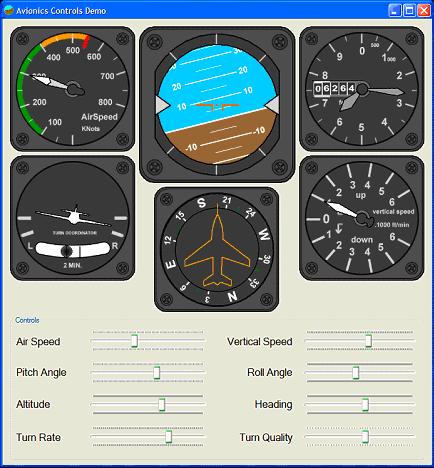
This was the original project that I found on the internet that got me thinking about a windows ground station.


The brilliant ArduPilot ground station prompted me to look for a solution because it is difficult for me to have labview installed on my machine. Doesn't comply with our software audit and besides that I am not happy about the price of labview.


I like arduino and the microsoft micro framework, the two products seem to have their places in this world. As such I decided to see if the Micro framework could provide a 3/5 volt mini ground station.


My project has developed since I found these controls but I include a link because the maths in this project makes creating scalable/resizable moving controls very simple.


http://www.codeproject.com/KB/miscctrl/Avionic_Instruments.aspx


AvionicsControlsDemo_ViewMe.JPG


GroundStationT


My ground station project is now working with text based imu output or with the ardupilot. The instrument controls are now single widget windows that can be re-positioned and resized independantly.


The main control is the attitude indicator control. When it is moved all other control move with it. The mouse wheel is used to increase/decrease the size of an instrument.


The application has a main frame but the instrument controls are displayed outside of the main frame. Yhis allows the frame to be minimized and the instruments to occupy the entire screen.


The view menu currently has a google map showing current position and next waypoint, current work is to enable the map to be displayed in place of the ground (below the sky) in the attitude indicator and to allow more transparency of other instruments.


The google map link is going to be interesting to develop alonside a Telit GSm module that I have. By the google code initially came from the ArduPilot config tool, so hats off to the clever ground station pair!


I initially coded the processing of serial telemetry and the instrument controls using the micro frame and a tahoe II board. This proved the project would work and once the various instrument controls are working with proven tested values, I indend to convert the project back to the micro framework.


The current windows project can be found here but it is untested in the field and should not be used for actual flight monitoring. The current project is just a .exe, it requires microsoft windows framework 3.5 and will fail to run if you don't have it installed.


FYI: Current cores (board support) provided by MF4 are as follows but you can also build your own using the free porting kit!


ARM v4,

· ARM Thumb

· Thumb-2

· Blackfin


Development Boards

The porting kit provides sample ports available for the development boards listed below. These sample ports include the source code.

- Atmel SAM9261-EK development board (ARM core AT91SAM9261)

- Atmel SAM9RL64-EK development board (ARM core AT91SAMRL64)

- Atmel SAM7X-EK development board (ARM core AT91SAM7X512)

- Phytec phyCORE-ARM7/LPC2294 (Rapid Development Kit PCM023, ARM core LPC2294 by NXP)

- Embedded Artists EA-LPC2478 development board (ARM LPC2478 by NXP)

- Crossbow MOTE2 platform from Crossbow (for Marvell PXA271 processor)

- Freescale i.MXS development kit (Freescale MC9328MXS)board for i.MXS processor

Memory Requirements

The memory requirements for the .NET Micro Framework depend entirely on which features you use. In its smallest form, the framework requires 64 Kb of RAM and 256 Kb of flash memory.

Read more…