All Posts (11086)

Sort by
Moderator

3689454625?profile=original


Perth, Western Australia. COPTERCAM is cleared for take off after being issued with an UAV Operator Certificate from the Civil Aviation Safety Authority (CASA).


COPTERCAM becomes the first operator of the Droidworx multicopter airframe and Photohigher camera gimbal to be award an operator certificate (OC) from any civil aviation authority in the world. Obtaining government approval to operate a UAV in urban areas was quite a task, undertaken over a 9 month period and requiring thorough assessment by CASA.

COPTERCAM founder, Mr Hai Tran said: "After observing a number of illegal operators flying their drones with disregard to public safety and privacy, we share the concerns raised by civil liberties group.  Commercial operators must be held to a higher standard of care because they owe it to their clients and the public, whose privacy and safety may be put at risk.  Our OC application went pretty smoothly because all our UAV pilots also hold a Private Pilot Licence at a minimum.  This allows us to share the airspace with real aircraft and ensures that our pilots have the right mindset about aviation safety".

3689454702?profile=original

Read more…
medium_route1map.pngHow to get good results on your mapping mission with any backend processing service!
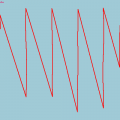
  • Imagery should have at least 60% overlap and should have at least 20% orthogonal overlap.
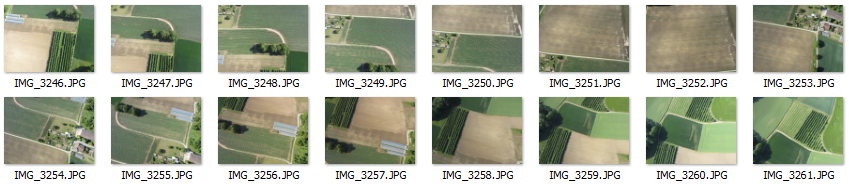
  • Imagery must be shot in sequence. See examples below.
  • Images must contain required EXIF information. [more]
  • Images are shot with one camera and focal length.
  • Images should not be pre-processed. (i.e. Lightroom, Picassa, etc)
  • Images are NADIR or near vertical.
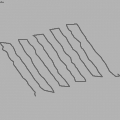
  • Flight Path should be Parallel Line (aka Lawn Mower) or other large overlapping style.
  • Flight Path should provide sufficient coverage of survey area. Meaning a large amount of overlapping images for target area.
  • Flight should be from sufficient elevation. (i.e. >80 meters)
  • Try a small subset of your imagery as a test. We process 15 images or less for free!


Flight Mode / Geolocation Guidelines:

  • Use a supported Flight Controller with supported export format. [more]
  • Sync your camera internal time with your flight controller GPS time. [more]
  • Imagery EXIF timestamps must match flight controller log timestamps to obtain rough georeference.
  • Flight Controller log exports should be in WGS84 for Latitude and Longitude. Elevation in (m) above the earths surface or actual elevation of image. Camera direction in (d).
  • Each image must have a matching GPS/IMU log entry.
Imagery Sequences with Problems:


possibleerror1.PNG?width=750
The imagery sequence above may experience problems processing due to image P1020271.JPG. This image does not have connecting
control points between P1020270.JPG and P1020272.JPG. Note: This is a small subset of over 100 images.

medium_route1map.pngFlight Path


badsequence.PNG?width=750
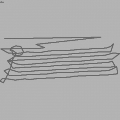
This sequence attempts to show aerial images with a small amount of overlap shot out of sequence. You can see the flight path does not

include a large amount of imagery overlap.

medium_route2map.pngFlight Path


Imagery Sequences with Good Results:


goodoverlap3.PNG?width=750
This sequence shows a good amount of overlap between images. A large amount of control points are detected in order to scale, rotate and mosaic. This is a small subset of over 241 images.

medium_route3map.pngFlight Path


goodoverlap2.PNG?width=750
An example of a flight from Pteryx UAV with a large amount of overlap. This is the idea situation.

medium_route5map_0.pngFlight Path


goodoverlap4.png?width=750
Another example of an imagery sequence with a large amount of overlap.

medium_route4map.pngFlight Path


Hope this information helps all you UAV mappers out there. Cheers,
JP Stoermer
Read more…

3689454408?profile=original

http://dronemapper.com

Here is an example flight from a Pteryx UAV with 181 Images at 10 Mega Pixel. The flight elevation was around 275m average. The GSD (Ground Sample Distance) is around 13cm. We don't have support for GCP (Ground Control Points) yet, but that is on the way and will make results very accurate. We are still calculating the accuracy of our flights but they depend on a number of things because GCP are not used. This method can only be as accurate as the GPS unit. We estimate a 3-8m accuracy for georeferencing without GCP.

3689454323?profile=original

The above data is viewed in QGIS using Openlayers Plugin. It will read the .tfw, you should set the projection or your overall project projection to 33N WGS84 UTM.
Low Resolution 3D Point Cloud data is viewed in MeshLab.
 

You can download the results of this flight in high resolution for evaluation here.

3689454429?profile=original

3689454387?profile=original

3689454442?profile=original

I also setup an automated model generation from meshlabserver with a webgl viewer. It allows a nice preview of the 3D data. Tons of other updates and improvements thanks to feedback and testing from the beta crew! Thanks,

JP Stoermer

Read more…
Developer

jDrones News: jD-X1 foldable basic frame

3689454463?profile=original

jDrones X1 basic frame, foldable

As one of our factories is manufacturing X525 type frames, we were able to make custom made frames for all our ArduCopter users. On this frame you can fit all earlier jDrones ArduCopter parts and extra accessories and we call it as jDrones X1.

Frame has thick aluminum arms that can take a lot of beating and same does those landing gears, they are all spring loaded to reduce forces from "bad landings". 

Motormounts are made from stronger material than original X525 type frames usually are using. Frame also includes carrier boards and power distribution boards. 

Frame details:

  • weight is: 430gr 
  • fully foldable
  • aluminum/fiberglass material
  • power distribution
  • battery strap
  • style: quad
Best thing is it's price: 79.95

In it's folded form:

3689454561?profile=original

and more frames are coming soon..... 

Read more…

Tracking antenna

3689454358?profile=original

Hi guys!
In the last few months I have been working to develop an advanced tracking antenna for my new CGS. Unfortunately I haven't got no more time to finish this project, so I decided to release it Free to the community....

Basic Mechanics feature:
•    24dBi High gain dish antenna
•    9° Horizontal –vertical  beam
•    360° Endless pan - 180° Tilt
•    0,006° Pan Resolution ( microstep mode)
•    0,05° Tilt Resolution (microstep mode)
•    High torque speed stepper motors
•    Precise bearings ad belts, for smoother operation.
•    2D construction (no need of 3 axis cnc)
•    Cheap alloy-pvc-fiberglass
•    Car roof mounting
•    7kg weight

Basic electronics feature:
•    Integrated processor for standalone operation
•    Single usb connection

•    Integrated Serial usb converter for datalink
•    Dual precise stepper drivers, low noise
•    AHRS for stabilize the antenna
•    10Hz GPS
•    Electronic tilt compensated Compass
•    Internal lipo battery

The Electronics is almost done, just need to be checked again ( is the first PCB I develop).
In attachment a ZIP with all the files inside.

Unfortunately as you see on this post, my written English is very bad! I will try to give an help (as best I can) to answer to all the questions.

Regards,trackin antenna.rar

Read more…

The Grand Canyon

Here it is, the Grand Canyon. This one shows one of the worst encounters with officials regarding our UAV projects to date. Nevertheless, it's one of the most beautiful places to fly at. To stay out of trouble, fly into the Grand Canyon from outside the National Park fences.

Read more…
3D Robotics

3689454297?profile=original

From Extremetech, a glimpse of a way to do indoor navigation in public spaces:

For all of their awesome applications — from portable navigation devices, to self-driving cars, to cruise missile targeting — the American Global Positioning System and its Russian cohort GLONASS have two fundamental flaws: They don’t work indoors, and they only really operate in two dimensions.

Now, these limitations are fair enough; we’re talking about an extremely weak signal that has traveled 20,200km (12,600mi), after all. Passing through concrete and other solid obstacles is hard enough for a strong, short-range cellular signal — you can’t seriously expect a 50-watt signal traveling 12,000 miles to do the same. Detecting a GPS signal on Earth is comparable to detecting the light from a 25-watt bulb from 10,000 miles.

The situation is a little more complex when it comes to detecting a change in altitude; GPS and GLONASS can measure altitude, but generally the data is inaccurate and too low-resolution (on the order of 10-25 meters) for everyday use. Even with these limitations, though, space-based satellite navigation systems have changed almost every aspect of society, from hardware hacking to farming to cartography to finding a girlfriend.

What if we had a navigation system that worked indoors, though? What if we had an Indoor Positioning System (IPS)? Believe it or not, we’re very nearly already there.

Last year, Google Maps for Android began introducing floor plans of shopping malls, airports, and other large commercial areas. Nokia, too, is working on an indoor positioning system, but using actual 3D models, rather than 2D floor plans. Just last week, Broadcom released a new chip (BCM4752) that supports indoor positioning systems, and which will soon find its way into smartphones.

Unlike GPS and GLONASS, there isn’t a standard way of building an indoor positioning system. Google’s approach tracks you via WiFi — it knows where the WiFi hotspots are in a given building, and through signal strength triangulation it can roughly work out where you are. Nokia’s solution is similar, but it uses Bluetooth instead of WiFi, making it higher resolution (but it would require the installation of lots of Bluetooth “beacons”). Other methods being mooted involve infrared, and even acoustic analysis. None of these approaches are accurate or reliable enough on their own, though — in spaces that are packed with different materials, and roving groups of attenuating meatbags, these signals are simply too noisy.

The Broadcom chip supports IPS through WiFi, Bluetooth, and even NFC. More importantly, though, the chip also ties in with other sensors, such as a phone’s gyroscope, magnetometer, accelerometer, and altimeter. Acting like a glorified pedometer, this Broadcom chip could almost track your movements without wireless network triangulation. It simply has to take note of your entry point (via GPS), and then count your steps (accelerometer), direction (gyroscope), and altitude (altimeter).

Post continued for another page here.

Read more…
3D Robotics

Another great (and very DIY) quad project

3689454258?profile=original

Totally scratch-built electronics, including MPU-6050 sensors and DSPIC processor. Fantastic build log. From Hackaday:

What a sweet thing it is to see the first outdoor flight of a quadcopter. [Botched] has done a wonderful job of documenting the entire build process. Take a look at all that he has done, then jump after the break to see the extremely stable test flight footage.

Earlier iterations used feedback electronics that he designed, etched, and soldered himself. We think they looked pretty good, but he was not happy with the performance. He spent a bunch of time redesigning the IMU board, but after he printed out the PCB artwork he decided his soldering was not up to the QFN challenge and he went with a pre-assembled breakout board.

His post about PID tuning is quite interesting. He removed two of the motors and mounted those opposite ends of the chassis to a hinged stand. This let him tweak the feedback loop until the two remaining propellers were able to maintain balance even when he nudged the unit.

His test flight footage is accompanied by an on-board camera shot. He simply taped a smart phone to the battery and let it roll. Make sure you turn off your speakers before watching this one or the motor noise will let the boss know you’re reading Hackaday again instead of working.

Read more…
3D Robotics

3689454277?profile=original

From SUASNews:

Cameras for navigation and mapping

One innovation of the flying robots is that the devices are able to stabilise and locate their position using only the cameras and a miniature computer installed on board, without the need of a connection to the ground station. The flight movements of the helicopter are calculated in real time from the camera imag-es. A flight control unit compares these with the required values and corrects them in case of deviations.

This technology, developed in the Autonomous Systems Laboratory at ETH Zurich, has two weighty advantages compared with GPS-based flying robots. First, it works both in the open air and in enclosed spaces. The second is that the flying robots can navigate where GPS fails; for example, due to the density of buildings. The camera-based technology allows for a more accurate positioning of the aircraft than is possible with GPS, explains the project coordinator, Davide Scaramuzza. Depending on the environment, GPS errors can be as great as 70 metres — much too imprecise when several flying robots are in close proximity to each other in the air.

One of the three on-board cameras provides data for a flight control unit, and the other two are used for 3D modelling. Via WiFi, the on-board computer transmits the recorded images to a computer on the ground, which then creates a 3D map of the overflown terrain. The 3D map shows obstacles for the flying robots, and it is possible to use it to calculate, for example, the best position for the complete surveillance of the area. The technology of the 3D modelling was developed by the Institute for Visual Computing at ETH Zurich.

Future use in disaster relief missions

One of the disadvantages of the conventional construction style of flying robots concerns their weight and thirst for energy. This is why it was one of the goals of sFly to develop more efficient algorithms that require less processing power, while also increasing the computing power of the flying devices. In collaboration with Ascending Technologies, a Munich-based company that specialises in flying robots, a flying robot with six rotors was developed that weighs only 1,500 grams, including three on-board cameras and a miniature computer.

The new micro helicopters have a diameter of about 50 centimetres. They are designed to manoeuvre in tight or even enclosed spaces, and to detect and fly around any obstacle. Possible uses could include protection or rescue missions. They are ideal for flying over disaster areas and giving a picture of the situation from the air or locating victims. “This is a research project that above all aims to explore the technical possibilities. However, we can well imagine that the flying robots developed in the sFly project could be an important aid for rescue teams in disaster relief missions in the not too distant future,” says Roland Siegwart, head of the Laboratory for Autonomous Systems

The European sFly project includes partners from Germany, Greece, France, and Switzerland. Along with the two ETH research groups, the Centre Suisse d’Electronique et de Microtechnique (CSEM) in Neuenburg is also involved; see also: www.sfly.org

Read more…
Developer

Flight Control board "hot swap" adapter

3689454086?profile=original
Hi all! In the quad that I use to work i've a Mikrokopter "tower" (all board), I created an "hot swap" adapter that allows me to move all the board/receiver from a quad to another in just a minute.
In the photos I had not yet entered the base for the receiver (now is between the GPS and the NC), but now even that is connected to PPM Sum with Flight Control, all in a single "tower".
For safety reasons all the contacts are redundant on more pins, this is the list of contacts used for any "signal or power":

8 / - LiPo
8 / + LiPo
6 / C I2C
6 / D I2C
4 / + Buzzer
4 / - Buzzer
2 / pwm signal for each servo
2 / -5V for each servo
2 / +5V for each servo
2 / + Led Strip front
2 / + Led Strip rear
4 / + 5V Aux
4 / - 5V Aux
10 / Telemetry Port

This system is of course usable for any type of flight card, even for ArduCopter APM1/APM2, just obviously adapt the cards and the strips.
Certainly this adapter is used on heavy quad, since the bulk and weight (46g) would be ridiculous to install it on little quad.
In the photos are missing the four 10 mm spacer that fasten the two boards of the adapter with 4 plastic screws.
Obviously after each swap is necessary to load the appropriate tab setting flight and motors matrix table, simple and quick.


Marco Robustini
(AC Dev Team)

3689453990?profile=original
3689454203?profile=original3689454127?profile=original3689454160?profile=original


Tower ready to go, full Mikrokopter electornics with "3DR Radio" telemetry and rx s-bus, "all in one" installed in the "hot swap adapter".
Yeah, the new 3DR Radio work fine also with Mikrokopter boards! :-)
In the "male" base adapter there's the two pnp transistor and two resistor for the "led strip".


3689454224?profile=original3689454245?profile=original3689454183?profile=original

Read more…

Droidworx CX-4 build

3689453900?profile=originalFRAME: Droidworx CX-4

Main Camera: GoPro HD Hero 1

FPV Camera: ReadyMadeRC RMRC-600XV

Video TX:FPV Hobby 5.8Ghz 500Mw

Motors: 4 x RCTimer BL2830/13 850Kv with 20A ESCS*

FC: APM1 with Sonar

Battery:Turnigy 3s 5000mAh


More beautiful gear from the Droidworx crew, and even moreso with 3M Di-Noc controltac Carbon Fibre wrap.

Waiting for some decent motors, as these are grossly underpowered for the 1.8Kg she weighs!!!!

Also upgrading shortly to the APM2 as I'm hoping I won't need the sonar now with higher resolution Barometer, and far superior MEMS gyros onboard.

Read more…
3D Robotics

Demo of Android/APM PhoneDrone board

Great start for people interested in using the PhoneDrone Android/APM interface board.

From the video description:

Posting to this video: https://groups.google.com/forum/?hl=de&fromgroups#!topic/phone-drone-adk/...
Working basic release of my PhoneDrone Android Control. Complete source code of the Android and Arduino Version of this video can be found athttps://github.com/deadfalkon/PhoneDroneAndroidControl/tree/v0.1 andhttps://github.com/deadfalkon/PhoneDroneSamples/tree/v0.1

Read more…
Moderator

policedrone.jpg?w=600&h=400&crop=1

I wish my institute listed in this.. :-(

http://techland.time.com/2012/04/23/faa-reveals-list-of-colleges-and-police-departments-that-can-fly-drones/

Some excerpts..

"It includes a number of universities from all over the country, including Cornell University, Georgia Tech, Mississippi State University and Eastern Gateway Community College. It makes sense for universities to have access to U.S. airspace to fly drones — after all, they are the ones doing a lot of the research on new drone technologies, so they might as well be able to test their own creations near campus"

"While it’s easy to balk at the idea of students at a small community college in eastern Ohio flying drones over the heads of our youth, remember that most drones aren’t the Hellfire missile-carrying behemoths we hear about flying over Afghanistan. Small, inexpensive drones are routinely used by filmmakers and amateur hobbyists, meaning students could learn a lot from drones without putting anybody in danger"

and the list: https://www.eff.org/document/faa-list-certificates-authorizations-coas

Read more…

access point woes

ap01.png


Finally got Marcy 2's microcontroller access point to show up in a scan.  The end is still a long way off, but getting transmit & receive going was a pretty big undertaking.  Making it not crash is another step.

It basically took 1 month to port the driver & reach this point.  Before that, it was 1 month to bring up the board & get JTAG + USB working with a home made programmer.  Laying out the board & selecting parts took 1 week.


Just 2 months ago, Marcy 1 had just finished being documented.  It was a surprisingly short time.  She never flew again.

It's quite clear that scanning sometimes works & sometimes doesn't until the next reboot.  If it works, the 1st iwlist always shows the last beacon 500ms ago, no matter how long after the reboot.  Later scans show no new beacons until she disappears after 15 seconds.  
It could be that beacons are being sent, then they're stopping after the first scan.  Have observed if another computer scans 1st, the laptop can't find her.  Sometimes she doesn't show up at all, without any other scans.
Another idea is she's only sending 1 beacon.  Sometimes it gets through & sometimes it doesn't.  iwlist may have a bug where it shows the same time for the 1st beacon.
Beacons all seem to be handled in hardware, so kismet gives nothing.
kismet01.png

That's hostapd


  kismet02.png
  That's the aircraft.

Read more…

So it's changed a bit from what came in the original box...

3689453877?profile=originalNow got the long legs on the copter, and the two-axis camera mount and a camera, so I can show everyone that I

can't fly very well...

Some points on this airframe that are going to serve me well:

  • Lots of room underneath the main body for mounting various sensors (see below for notes)
  • Now an X configuration
  • Can adjust the balance a bit so I can accommodate a 6000maH battery (basically right under the center point of the frame
  • Modified electronics stack with APM on the top shelf, and various radios in the middle.
  • Got a new 2.4 radio GHz (Futaba) with a bunch of extra channels
  • Still need to dress the wires so it looks less like a cat toy
  • need to put the bracing back on the central body, else the legs get all saggy
  • Added a spur arm at the back.

3689453951?profile=originalWhat's that for?

  • I will mount the altitude sonar sensor back there, away from the electronic noise
  • White ball gives me a visual marker so I can hazard a guess as to which way the copter is pointing

So what next?
Well, I'm having a lot of fun just flying the thing again. I had some electrical problems which made me take everything apart so I could get to the power distribution board (which then turned out not to be the problem).

I now have a copy of VMware Fusion and Windows, so I can for the first time run the mission planner on a computer that I own.  So I might explore some of that Waypoint navigation stuff as well.

But the longer term plan is also why I bought a radio with a bunch of extra channels. And deep down, why I wanted a "drone" in the first place.

I am working on adding a second Arduino (probably an APM because I've got a couple of the old ones and one of the new purple ones).  The second processor will run a sensor array under the main body, with sonar, infrared and possibly optical flow sensors pointing in many directions. This will let me do object avoidance, and dynamic path planning based on knowledge of where we are, where we want to be and what is happening around us. This processor will communicate with the main (original) APM using MAVlink commands, and will be controlled/adjusted by some of the spare channels on the radio. Will be interesting to run "multi-station MAVlink" with both the flight control and navigation computers listening on the same channel.  May end up using some of the secondary pins as flow control between the two APMs

This will let me use the main APM as a "flight control computer" which will take inputs from the R/C channels and the MAVlink, That's also why I'm moving the "altitude sonar" away from the main body, so with luck there won't be a lot of noise/cross-talk.

I will be using one of the spare r/c channels as a fail-safe switch (I might reuse CH 8) so that I can tell the flight control computer to ignore any input from the navigation computer; then I'm back to having a slightly over-weight Arducopter.

I've got some diagrams and notes up on Google Docs; once I get a few evenings to tidy it up, I'll share it here.

Read more…
Moderator

Today I had my second test flight with the latest Firmware.

The results are incredible. The quad was very stable and solid also on very hard manouvres.The improvements are beyond my expectations.
You judge:

The Board tested was the VRIMUFULL with the MP32V3F1 and the BMP085 barometer.

Recent changes include:


- Updated default values for Stabilization
- Changed main loop timing.
- Fixed a memory bug.

This is the port of the Arducopter 2.6 firmware. Thanks to the original developers.

Still ALT_HOLD and GPS must be improved.
To choose your board in the config.h fie you have these options
(please comment with // what you don't need):

BOARD selection:
#define CONFIG_APM_HARDWARE MP32V1F1 //old board (rev. 1)
#define CONFIG_APM_HARDWARE MP32V3F1 //new board


GYRO and ACCELS selection:
#define INS_VRIMUFULL //standard sensors
#define INS_MPU6000 //new MPU6000 sensor


BAROMETER:
#define CONFIG_BARO AP_BARO_MS5611 //new barometer
#define CONFIG_BARO AP_BARO_BMP085 //old barometer


SENSOR BOARD:
#define CONFIG_MAG MP32NAVYSENSOR //standard board
#define CONFIG_MAG MP32NAVY2012 //new board with GPRS and dataflash
Once uploded please follow these steps:


1. In CLI mode SETUP --> erase and Reset.
2. Calibrate Radio
3. Calibrate compass by arming (without propellers!) and turning the copter on all axes.
4. Level and check that all variables are consistent.


The default parameters are based on my quad and my experience.

Please tune for your copter.
This firmware was tested with VRIMUFULL + MP32V3F1 + MPU6000 and VRIMUFULL + MP32V3F1 + STANDARD SENSORS

https://www.youtube.com/watch?v=SczauszAlbA

The last revision of code is available here :

http://code.google.com/p/multipilot32/downloads/detail?name=vrobotix-ide-0.0.5.5.2.rar&can=2&q=

This is orginal blog post by Emile on virtualrobotix :

http://www.virtualrobotix.com/profiles/blogs/latest-firmware-test-0-0-5-5-2

http://www.virtualrobotix.com/profiles/blogs/latest-firmware-test-0-0-5-5-2

Read more…