I've been using the PTGui software ($121) for years to stitch together aerial shots into composite mosaics, but noticed in Krzysztof Bosak's post that Microsoft Research had something called ICE that could be an alternative. I checked it out and it's fanstastic!
Micosoft ICE is free, fast, easy to use and in my experience much more accurate than PTGui. Highly recommended.
BLUE SNOW, RED SNOW, BROWN, BEIGE, GREEN. The samples were not the wisest, sharpest, largest nor the most glorious ones.
The stitching was made using fully automatic method (minus manual entering of time offset for camera) being developed for Pteryx UAV. However you could get plausible result with Microsoft ICE if your aim is surface documentation and when you can give up some accuracy.
Observe as in some cases you have highly varying cloud cover (lower-left corner). The two largest maps are around 2km^2 here and are not the biggest we have produced, as surface coverage varies between 3km^2 per 2h of flight (square map made of 75% overlap photos +reserve) to 24km^2 (80% overlap 80km straight line +reserve).
I think this post illustrates the key selling point of UAVs: it really does matter WHEN you make aerial photos and better do it below cloud level.
After failing in my autonomous rise-off-ground launches at Sparkfun and seeing Doug do so well with his catapult, I've been thinking about building my own launcher. So was this kid. Watch his research, experiments and ultimate lessons. A really nicely done video.
Read more…
Hey all, though I might share the attached photo with you to show off some mods I've been working on whilst I wait for spare props to arrive from Thailand, after not loading code properly and flipping the copter on its maiden voyage.
Widened the landing gear to more stability, as well as increasing ground clearance for my GoPro, converted the dome to just two complete pieces rather than the fiddly centre piece, trussed arrangement, and hacked a standard USB cable to it can be plugged in easier for uploading etc.
I'm working on a new battery mount as well for fixing the GoPro, until I figure out how I'm going to do the pan-tilt, FPV setup.
Posted by Magnus Selin on April 30, 2011 at 12:00am
Previous wednesday, my APM arrived, but I haven't got any time to take a look at it. As soon as possible I should solder the pin headers, so that I can do some testing. Yesterday my motor and batteries came, which means that I hopefully can get the plan into the air by next week.
Below is a picture of the plane I am going to use. It's my brothers old .20 model, which I found of the loft and I have got his permission to use it. It haven't got airborne yet, although the plane is around 10 years old.
I will post some minor updates here, but there's more to be read at my official blog at http://uavbee.blogspot.com/.
I've been playing with wheeled robots for a while, using the Basic Stamp as a controller. Just tinkering, and more interested in the software side of things (as well as having something that annoys the cat). My enthusiasm died out about 7 years ago, then my son gave me a Lego Mindstorms NXT kit for Christmas, and I was off and running again.
At about the same time, a co-worker got me started on radio controlled helicopters (Blade CP/2 to start with, moving up to Blade 400 and TREX-450 over the last few years). You can't have too many expensive hobbies :)
Managed to do quite well at this helicopter hovering in the back yard, and was doing quite well until about a year ago when I flew my pride and joy into a tree and broke just about everything except the tree.
"I wonder," I wondered, "if it would be possible to combine my robotic hobby with my RC flying hobby?"
Poked around teh intarwebs a bit, and ended up here looking at the APM and the Arducopter code.
Thus started work on what I am now calling Coptermatic, the Automatic Helicopter. (with apologies to Wallace & Gromit)
So off we go:
Got my workbench set up, got me new Weller soldering station set up, played with some Arduino programming for a practice, and decided that tonight was the night.
I solder all the pins on the APM. I solder all 48 pins on the right angle servo connector (the three pin monstrosity on the end of the board). I've got all the pins on the APM,
But the servo connectors seem a bit fragile, and my attempts to test-connect a couple of servos and Rx connectors seems wonky. Imagine my amusement when I discover that I've soldered the damned servo connector on backwards. For that connector ONLY, the black plastic bit doesn't go flush with the top of the board. What's worse, I compared what I was doing with the pretty picture in the instructions four or five times and didn't notice my error.
OK, so now I am sort of stuck. I'm an amateur with the soldering iron (more of a software engineer with a predilection for tinkering). I'm not at all sure how to unsolder 48 connections; I think I need something more than desoldering braid and bad language.
The current plan (as blessed by my long-suffering and patient wife) is to use this APM as the brains for a small wheeled robot which I shall call the Pipbot (in honour of the Fallout series of games) and to buy another APM from DIY Drones for the 'copter.
So a bit of a (not-so) cheap lesson in following instructions. This hardware stuff is a lot less forgiving than software.
This video show that the controller working for the first time. !!!!!Awesome!!!!!!
I could barely keep a wheelie up and going before I started using my controller.
Tuning the code a little more before the ride. >>>>>>>>>>>>>>>>>>>>>>>>
Ever since I was a kid I wanted to ride wheelies. So I built a Arduino Wheelie Controller and started enjoying longer, safer wheelie'ing. I use an Arduino Duemilanove ATMEGA 328 to control a LARGE digital servo powered with a homemade servo power curcuit, coupled to a hydraulic hand brake. The handbrake is connected to a steel braded brake line that runs down and connects in place of the rear hydraulic brake reservoir. The controller uses a triple axis accelerometer and a single axis gyro to calculate when and how much brake to apply. This controller can be used on 4wheelers and motorcycle with rear disc brakes.
<<<<<<<<<< Controller
1.)Arduino Duellinove
2.) Triple axis accel & single axis gyro "Black Box"
3.) Power supply for LARGE servo
4.) LARGE DIGITAL High speed & Torque servo w/ metal gears
I connected my servo to a handbrake like this one and mounted it under the rear fender. >>>>>>>
I used this adapter to connect my handbrake to the rear brake master cyclinder.
In fact with my installation , i am using currently 2 Remzibi OSD.
-The one in the plane is standard with a Flytron Current sensor which is measuring the Instant consumption and the Average current consumption + Radio RSSI + Home + plane battery voltage + Radio RSSI + GPS Altitude and speed.
-The other OSD is for the Ground station and currently i am using this OSD for Video reception RSSI monitoring and Ground station Voltage control.
Thanks to your wonderful OSD and i manage to overlap the 2 OSD information and Display on my goggles.
In real time , i have on my display all the information regarding the Radio RSSI from the plane and Video Ground Station RSSI and voltage.
Currently i am using HK 900Mhz 200mw and the RSSI video voltage available is -4.7 Volts for a minimum video signal strenght and -0.2 Volts for a maximum video signal strenght. I am using ADC2.
Video from the Plane ------> HK receiver tuned on 980Mhz -------> Video RSSI to Remzibi ADC2 + Video output from the receiver to Remzibi Video input --------> Video Ouput from the Remzibi to video input of the Eagleeyes diversity --------> Video goggles display with both information (plane and Ground station).
With the OSD configuration tool , i am using two configuration sets for the display.
-One OSD Setup for the plane Inboard OSD. -One OSD Setup for the Ground station OSD.
The information overlapping is very easy to achieve (Remzibi configuration tool) and so far it is working very well.
Currently , i am retrieving the Video RSSI from one receiver only (the one with the 8db patch antenna).
(see picture above)
Hereafter , a picture for the 900Mhz receiver RSSI Pin (The one shown by the philips screw driver)
This configuration is really useful for long range flying and both RSSI information are assisting me for a safe flying.
Read more…
This time I've prepared the power board that will distribute power to all 6 ESC's and to additional devices (video TX, camera controls receiver unit, tracking system TX, LEDs and more...)
Important issues were: Lightweight, simple, high current, fail-proof.
And as we all LOVE pictures:
the view on the following picture is the BOTTOM of the central plate.
yes, the power board will stay under the main plates. it will allow interference free environment for the electronics mounted ABOVE the plate. as well as don't pissing off the magnetometer with high currents flowing nearby.
cutting the stencil paper:
PCB pen drawing:
After a few minutes of dremel-ing:
and... there you go.... nasty copper etching :
in it's final position - with nylon standoffs (mmm... guess why):
This is a screenshot of part of one of my MP3.0 test flights from yesterday. The plane was programmed to fly figure eights, using the UDB Logo program below. The GPS track is shown at 1Hz, and the dead reckoned IMU track is shown at 4Hz. The plane had taken off very recently when it started this track, so it was still calibrating for the wind speed. That's why the first side of the eight (blue) is a bit less pretty than the 2nd half of the eight (yellow). Each circle is programmed to be just over 100m in diameter, but I used a 20m waypoint radius, so the circles became much smaller.
There are a few things to notice here. One is that the dead reckoning is pretty darn close to the GPS track. The other noteworthy point is that the wind was blowing at almost 20mph, and the UDB adjusted its navigation gains dynamically as it turned into and away from the wind, to keep the course over ground in line with the flight plan. Thanks to Bill for both of these improvements!
Here's the quick and dirty UDB Logo program I used for these eights:
So, I decided to try the bare minimum first, then add complexity as needed. It turned out that dead-reckoning worked pretty well. With some refinements, I think it will work REALLY well. Also I came to the conclusion that heavy reliance on GPS will doom any bot to slow speeds. The location error and slow refresh rates make it useless for speeds like 30+ mph (which is my goal). I understand that the speed and direction improve at higher speeds. I guess my point is that if you rely too heavily (or completely) on it, and it only updates at 1 Hz (or even at 10 Hz), you will be into the wall before you know where you are. There has to be some degree of location estimation between updates to keep you on course (at least on a tight course like the sparkfun parking lot).
Steering
Steering was simply proportional to the angle between the current heading and the waypoint, with a 90 deg. limit. (next time I'll make it proportional to speed, or yaw rate limited). I used a nominal setting for "straight", then just added or subtracted from that depending on the direction. The one problem I had with this is that my "straight" setting changed at some point, so the bot would very slightly pull to one side. As it would approach the waypoint, it would eventually get close enough to realize that there was a significant error in heading and swerve a bit right before the waypoint. Maybe a real PI controller, emphasis on the I would help correct that.
Throttle
The throttle was even more embarrassingly crude. It was open loop, with a fast and slow setting. Within a certain radius of the waypoint it would kick down to slow to navigate the turn, then kick back up to fast for long distances. Since I have an encoder on the transmission, I could have easily incorporated a PID controller (actually probably just proportional) and controlled the speed really well. I actually wrote that code, but didn't have time to test it.
GPS
Chassis
My car, BTW is a Losi XXX graphite. I had bought one as a roller a while back and though it would be perfect for this application. I also thought of using my emaxx, but its plush suspension rolls a lot during turns, which, if I understand correctly, will add error to my gyro. I figured I had to keep the gyro as close to parallel to the ground as possible.
In regards to wheel slip and dead reckoning, I haven't figured out how much I have to worry about pushing through turns. If the front wheels slip a bit, will it matter? Will the gyro data still be valid? Obviously if the rear wheels slip, then I've got a problem, because that's where my odometer is.
Odometer
One other issue that I meant to address was wheel expansion and it's effect on the odometry. I could come up with a simple multiplier that is proportional to the speed: simple curve fit. There's lot's-o-stuff I never got around to.
Set has spare parts for all components, in case of flight crashes with frame damage. Content: - Dome arch (4 + 2 spare) - Dome center lower (1 + 1 spare) - Dome center upper (1 + 1 spare) - Motor mount lower (4 + 2 spare) - Motor mount upper (4 + 2 spare) - Landing gear fin (4 + 2 spare) Total: 28 parts Based on the opensource design: http://code.google.com/p/arducopter/source/browse/#svn%2Fbranches%2Fjpkh%2Fframe Correct line widths as suggested in Ponoco design templates, which is not true for previous Ponoco ArduCopter files. Enjoy.
Although it was a short lived flight it was fun. I always enjoy flying with my Pops, what makes it better is that I have both video from the ground and onboard the aircraft. This helps identify what mistakes I made and why I had an unsecessful fight.
Over wieght .........aircraft not me LOL!!
I was flying to LOW
I was flying to SLOW
I was facing the sun
???????
As I almost start my downwind as AirCraft stalls to the inside. I try to roll left but it's to late and not enough power to pull out of it. Watch my Airspeed drop right before I stall.
This was at about 4am when i solved the last bug and it wanted to hover.
Like my painters tape Battery Straps... I found some velcro later.
This is a fasttrack guide for building an ArduPilot Mega QuadCopter. If you have already started or are about to start building a QuadCopter this guide is ment to be used as a reference to help fill in the blanks with your build and first setup.
1.) Remember SAFETY First, Always Remove Propellers when working with the quadcopter powered on the bench. Proppellers can cause serious injury to You, others, small childern, and animals. Remember not to forget to read up on Lipo Safety, Don't burn your house down!!! LiPo Batteries are great batteries if used correctly.
After building your QaudCopter bench testing is a great way to determine the QuadCopters true power consumption needs. An Amp Meter can be used to verify that the battery(s) are opperating with in a safe "C" range. Before you start flying around with your QuadCopter you should test your battery time on the bench to get an average idea of how long your batteries will last. Setting the transmitter count down timer will help remind you when to land. Only if you remember to start it. :) My rule of thumb is land before the battery(s) get to low. Low voltage battery alarms are a great way to help protect your batteries and your aircaft form power failure.
Square Aluminun tubing 1/16"' thick x 3/4'' x 3/4''
1/16" x 1/2" Flat Stock
1/16" x 4"x4" Plate
Secured together with 5/32" Rivets and Silicone in between.
24'' between motors
Frame only Weight: 350g
This Frame is more on the tough side, i added Lightening holes to help lower the weight. The Lightening holes only subtracted about 30g of weight... My next frame I pan on using carbon fiber arrow shafts and curcuit prefboard in hopes of creating a strong and even lighter frame. Less weight = Longer flight times.
!!!!!!!!!!!!!!!!!REMOVE PROPS until you are ready to fly!!!!!!!!!!!!!!!!!!!!!!!!!!!
This video will help you Balance your Props
Installing Motors:
Warning!!!!!!!!!! Do Not Install Props!!!!!!!
Motor:
Model: TR28-22B-1400 Max Eff: 5A Max Load: 8A Kv: 1400 Weight: 36g Pull: 100~450g Prop: 8x4 or 9x5 Voltage: 6~9v Length: 23mm Power: 70W+
9 x 5 Propeller
QuadCopter ready to fly weight 990g
These motors are great!! During bench testing each motor measured 5 amp's with a total of 20 amp's constant with all 4 motors @ a hover and climbing to 26 amp's with sudden throttle burst. After a 7 min hover around the motors stayed very cool. The only down side to these motors is that you need to buy 6 to make sure you get 4 really good ones. One of my motors has loose bearings and vibrates really bad sometimes. I also recommend getting at least one extra motor just in case you crash. Don't for get props too... :)
Watch and listen to this motor vibrate on takoff.!!!!!!!!
I like these ESC because they come ready to go out of the box, although you should always make sure each one is programed the same first. During my bench testing they barely even got warm.
How to correctly connect motors the first time with this setup is easy. Use the identifiers to help u connect each motor. Each motor has 3 wires Black, Red, Yellow, Each ESC has 3 wires all red but labled at the ESC "A,B,C".
Start with the Front & Rear motors3 Front & 4 Back
"A" wire from esc connects to RED wire on motor
"B" wire from ESC connects to BLACK wire on motor
"C" wirre from ESC connects to YELLOW wire on motor
When connected correctly front and rear motors should spin
in the same direction Clockwise "CW"
Left & Right motors 1 LT & 2 RT
"A" wire from esc connects to BLACK wire on motor
"B" wire from ESC connects to RED wire on motor
"C" wirre from ESC connects to YELLOW wire on motor
The left and right motor should also spin in the same direction as eachother but in counter clockwise "CCW"
Connecting ESC's to Main Power connecter
I recommend soldering these connection for many reasons.
Cheap than buying connectors
Connectors can fail
Connectors are heavy
more dependable
Connecting the ESC's together is pretty straight forward
RED to RED
BLK to BLK
Use a battery pack to verifiy you have connected the wires to the battery connector the correct way afterwards.
Use heatshrik and electrical tape to protect the connections from contacting.
Mount APM Telemetry Port pointing forward @ motor # 3 for ( + )
Mount APM Telemetry Port pointing Between motor # 3 & 1 for ( X )
All this was cut with a razor knife. Score and Break
The preboard's hole line up with the pins on the bottom of the APM witch helps to lock it in place without glue.
<<<<<<<<<<< I used packing foam that came with the SparkFun Xbee radios on top of the APM and tightend down the nylon nuts to compress the foam and lock in the APM.
I did this with the RC Rx as well >>>>>>>>>>
________________________________________________
Connecting to the APM
_
Compass
GPS
Telemetry
At this end of the Compass I used a small dab of silicone to help protect the compass from being damaged.
I used 2 Plastic Headers to keep the Compass from being to close to the APM
Connecting to the compass is straight forward
compass connects to APM not IMU
Check Compass firmware with utility provided in software section of this blog.
Use Double sided foam tape to attach GPS.>>>>>
Telemerty Port is a good way to identify front of APM
Before Plugging a battery in you should always double check to make sure everthing is connected correctly, otherwise you run the risk of Desrtoying any chance of fun.
It's a good idea to hook everything up and get it all programed and talking before it's installed in to the Quad. This will help get you comfortable working with the APM.
Designed especially for FPV (First Person View) camera flight! This is a true FPV plane thats easy to build and comes packed with common sense FPV must-haves such as rear mounted servos for the elevator and rudder to help counter balance the additional radio gear. Other practical features include the large internal ply mounting trays for attaching large amounts of equipment in the desired position for correct C of G and of course a large canopy area, the canopy is not mounted to the frame allowing you to configure as you please.
This model is hand-launch which is easy due to combination of a large wing, and plenty of fuselage to grab a firm hold of, with the reccomended 4s power train, there will be plenty of power for the initial launch. The fibreglass fuselage is ultra tough and ideally shaped landing on grass, with a flat bottom and rear skid.
Specs: Material: Fiberglass & Ply/Balsa Wing Span: 1669mm (65.7") Wing Area: 34.3" dm2 Fuselage: 1181mm (46.5") Motor Mount Diameter: 58mm Distance From Center of Mount to Fuse: 114mm (max prop diameter 8"] Flying Weight: 2300g Minimum 4 Channel, 4 x Mini servo
Price is US$ 175 (or US$ 166 if you wait about half a minute for a pop up to appear)
The MatrixPilot dev team is happy to announce that version 3.0 is finally out the door! This update includes a hefty code reorganization into modular, reusable libraries, along with some important new features, and refinements to our dead reckoning and wind estimation algorithms. The code should also now be much easier to hack on as a basis for using the UAVDevBoard for other purposes.
Thanks to all the developers and testers who helped out with this release!
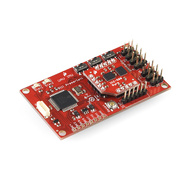
Support for up to 8-channel PPM RC Input on a single pin, freeing up other pins for other features, including up to 9 RC outputs. Compatible with this board from the DIYDrones store.
Added a new mission description language based on LOGO.
Allow sending waypoints (or UDB Logo instructions) mid flight over the telemetry channel.
Much improved Navigation, due to improvements in Dead Reckoning and wind estimation.
Improved camera-targeting logic and precision.
Added an RTL Hold feature that keeps you in RTL mode once it's been triggered, until you flip your mode switch. This helps avoid chaos if you're flying at the edge of your RC range.