All Posts (11086)

Sort by

Please visit the Kickstarter project page: iPhly.org/ks.

3689395734?profile=originalIt's all in the wrist. Roll the phone to roll. Tilt down to pitch down. Swipe up to throttle up. Swipe side-to-side to yaw.

You can store as many model memories as you like. You can give them long names. You can photograph your models using the iPhone's camera. Seven-segment displays on a TX are so last century.

The software is GPL. The schematics and SVN are on iPhly.org. The app is in the app store (if you don't want to compile your own). I am using KS to raise money for a production run.


Please visit the Kickstarter project page: iPhly.org/ks and share with your pilot friends.


Ari.

Read more…
3D Robotics
Michael Oborne's awesome APM Mission Planner now includes a very cool Ground Station mode. Check it out in the Xplane sim above--full cockpit dials, stats and moving map!

I've updated the Mission Planner software in the Download section, as well as rolled up the latest APM 2.0 bug fixes in this zip file. If you were having any trouble uploading waypoints download these two and that should fix it.
Read more…

OSD Comparison Chart

3689395873?profile=original

A few days ago, Ritchie posted in his blog an xls file about Choosing an airframe. That's was very useful comparison. 

I had been surfing the rcgroups.com and found very interesting OSD Comparison Chart. This chart was originally compiled and managed by Daniel Wee. I think it will be useful too in addition to Airframe Chart by Ritchie.

OSD Comparison Chart.xls


As for me, as a real user I can tell more about Smalltim OSD.


Read more…

Low Cost Jackaroo Under Development

3689395684?profile=original

Hangar 18 is pleased to announce that we have a licensing agreement with AttoPilot International to develop and produce an FPV version of the Jackaroo UAV. The new airframe will be a lower cost version that is designed and built with the FPV enthusiast in mind and will feature lower cost materials to let us pass the savings on to you. Please e-mail us at infor@hangar18uav.com and watch our website at www.hangar18uav.com for updates in the very near future.

Jimmy

Read more…

New project is born : Ordering parts

Well,

you're seeing at this moment a new project being born.


I will use an arducopter to do aerial photography, hoping to be able to do stable video as well.

for that i'm gonna need to mount a heave DSLR and lens, plus some RF control equipment, estimated at around 1KG payload.

therefore i chose to build a relatively big copter with big props and bigger motors.


I've just ordered the parts for my project:


from jDrones:

  • Frame kit, including the 28cm arms, bigger motors (880kv) and bigger props (12")

from DIYDRONES store:

  • the kit including the APM and IMU borads, GPS, and magnetometer.


Read more…

Really fast RC jet


Radio controlled jet powered by a Jetcat P160 SE.
On the 23rd of May, this Jet has been lasered @ 586 KpH
Which makes it a 366 MpH plane


now all we need is a really fast working ardupilot

Read more…
T3

Inexpensive Thermal Camera

I don't know how useful this would be but I thought it would be something that could be attached to a quadrotor to do some thermal analysis for a home to determine how to increase the efficiency of the heating and cooling systems by reducing the losses around windows and doors.

3689395595?profile=original

(Image pulled from his website)

Here's where to find more information.

http://www.cheap-thermocam.tk/


I'm tempted to get the materials just to run it to see how my house is!

Read more…
3D Robotics

APM 2.011 Beta released

3689395499?profile=originalAs part of the continuing APM 2.0 beta test program, we've released another package of updated APM software: New versions of the APM 2.0 beta code (2.01), Mission Planner (0.4.16) and HappyKillmore GCS (1.2.43).


Please upgrade your system to the latest code, which includes bug fixes, a few new features and improved stability. To be safe, load the code into Arduino and compile it as usual; the automatic firmware loading process may not always bring in the latest code during this beta testing period. [UPDATE; the Mission Planner will now load the latest firmware automatically, so no need to use Arduino or download the code yourself.]


New features include:

--More Action Commands implemented. 3689395418?profile=originalAs shown at right, we've added back some commands that you can issue in-flight via the HK GCS. More commands will be coming soon.

--More effecient memory handling allows APM to run MAVlink on Port 0 (USB) and Port 3 (Xbee) simultaneously without risk of memory overrun.

--Lots of improvement to the Mission Planner. Altitude in 3D waypoints should now be properly displayed.


Known issues:

--Some modes are not being reported correctly in HK GCS. Stabilize is being reported as "Guided", for example. We know how to fix this and it will be right in the next build.

--Writing waypoints via MAVLink in the Mission Planner is still sometimes unreliable. If you're having trouble, close it and reopen and try again.

--Vehicle Number is still being reported as 7, rather than 1. We'll fix that in the next build.


We'll be releasing new code each week for the duration of the beta test process. Expect a final Release Candidate by mid-April. As always, keep the bug reports and other feedback coming! (Bug reports to the Issue Tracker, please)



Read more…
3D Robotics

3689395576?profile=original
IMAV 2011 is May 23-27 in Huntsville, Alabama. There are two autonomous competitions--Indoor and Outdoor.


Indoor Competition:


Like the indoor flight dynamics competition, the indoor autonomy competition is open for all categories of MAV. The main goal of this competition is to demonstrate the MAVs capabilities of fulfilling a sophisticated mission including operation inside a small building with a covered ceiling. A video transmission from the MAV to a ground station is required for this mission. All tasks must be attempted in the order listed in the paragraph below.

The mission starts at point 1 behind a wall with a height of 2.5 m preventing the operator from seeing the MAV on the mission. Having overcome the wall, the MAV approaches the door at point 2. After entering the building, the MAV has to identify two targets (printed letters/numbers) at point 3. One of them is placed on one of the building's inner walls (vertical target), the other one is placed on the floor (horizontal target). See Figure 2.

see above)


Outdoor Autonomy:


This competition is open for all categories of UAV. During the outdoor autonomy competition the MAV has to identify a horizontal and vertical target, which are placed outside of the operator’s range of sight, fly through one arch, drop a ball at a certain point and land in a predefined area.

The MAV takes off from the airfield, passes the airfield buildings and heads toward the first target area. In this area two optical targets have to be identified. Once these targets have been identified, the MAV proceeds with flying through Arch A or Arch B (Figure 5 shows the two arches and the mission points for the different gaps). Only one passing counts. The positions of the arches are defined by WGS84 coordinates. Subsequently the MAV flies to the drop zone, where it drops a ball, which is shown in Figure 6. Finally the MAV lands in a predefined area on the airfield.

3689395424?profile=original
Read more…

ArduPilot Mega Instructional videos

3689395452?profile=original

Hello!

I am a recent owner of ArduPilot Mega and while I have been assembling, connecting and testing the board I made a few video tutorials. I think they will be useful for beginners and potential customers and will give opportunity to learn more about the APM.
Here are the links:

1. Intro


2. CLI and Test procedures


3. ArduPilot Mega UAV simulating in Xplane


I'm not so long working with ArduPilot, so please, don't judge strictly :)


Kirill

Read more…
Moderator

DIY Drones Member Projects

3689395321?profile=original

Hello DIY Droners.  

Please allow me to introduce the "DIY Drones Projects" Google docs spreadsheet.

Many DIY Drones members would like a place to lookup the details of successful DIY Drones projects completed by fellow members.  Unfortunately, the structure of the DIY Drones site does not allow us to build any kind of online respository.    That's where the "DIY Drones Projects"spreadsheet comes into view.  It's goal is to provide an additional resource for members to use while planning their next DIY Drones project. 


The concept is simple. Members who have successfully assembled and flown their UAV project craft are asked to share details with the community via an on-line form. At Chris's suggestion, the form will utilize the "KISS" approach and will provide as many drop-down selection choices as possible to minimize the time it takes to complete the questions.


When the form is submitted the results will be available to the community as a planning resource.  Ideally the results will be available as a raw download or filtered using available reports. We'll be able to see trends, determine common configurations base upon project platform type as well as other useful information.

Here's the kicker... I've build the form and spreadsheet, but we need need project details. If you have had success with your project, please take a few minutes and complete the "DIY Drones Member Projects". The results will be assembled and made available to members on the site.

Thanks,
Brian

Read more…

Choosing an airframe

3689387755?profile=original

The entire community runs off the knowledge of others, recommending things for each other, building things for each other, coding things for each other. As I am trying to get some code together for later release it came to me that the maths I'd been using to help an RC Groups thread would be spot on for us. I of course posted it but changing it regularly (thanks to new model planes being released) has meant the file has to be uploaded continually to the thread so here is its own blog post. I actually posted an older one on my first blog but as I've altered it somewhat.

The file is nothing special in itself it just collates information and shows the viability of an airframe mathematically (not physically). The maths evaluates the attributes of an airframe to a few existing experiences (the first 10) on how difficult they were to fly this gives values on the beginner safe planes (wing loading). Again advice dictated to motor recommendations, 90w/lb is a base touted value for flight, 100w/lb is claimed to be perfect for gentle flight maneuvers. Spare mass is the mass you can add without the airframe going over the specified beginner "safe" values. The Additions part is to calculate the size of motor once you start adding stuff thats why a battery is first :)


Its certainly not definitive and its certainly not a bible but it should help the first timers or modders looking for a new toy. Just because the maths comes out fine it doesn't mean the plane will. As we have seen some planes are good EasyStar clones with similar specs but space inside them is 40% less thanks to giant walls. Research is your friend I just hope this does a little research for you. Values for the additions are in row 3 so make it bigger and change them if you want (APM is just the basic APM setup - APM + oilpan + MTK).


Feel free to post specs for planes that you want or like.

Data required: Name, Wingspan, Wing Area, Flying Mass

Name: Northrup GlobalHawk

Wingspan: 66ft

Wing Area: 169sqft


RC Plane Data

Read more…

UAV for High School Senior Project

DSC00927.JPGhttp://arcticuavs.blogspot.com/ 

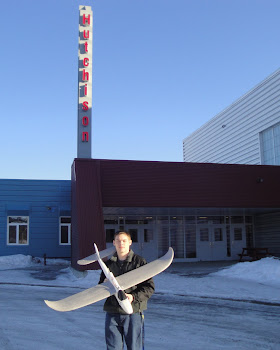
As a senior at my high school we are required to complete a senior project prior to graduation. The project can be anything from building park benches to making improvements to the school but it must benefit the community in some way. I have chosen to build a UAV to provide aerial photographs for agencies here in Fairbanks, AK like Fish and Game, city planning, and for public events. I paid for all of the UAV with my Permanent Fund Dividend check and will be able to keep it after the project (most students have to donate what they make).

Next year I will begin my mechanical engineering degree at University Of Alaska Fairbanks and plan to work in the UAV or oil industry after that.


My UAV blog is here and my project web page is here.


Read more…
Moderator

Dear Friends,

Holger the Creator of Mikrokopter have setup a new benchmark . We need to work hard to improve our project :)

Great Job Holger , if you have an Multipilot1.0 or MK FC 2.0-1  with navi you can check these new features.

http://www.virtualrobotix.com/page/multipilot-8-v10

He use on his fly control a 8 bit micro 644p the same of MP10 , the main difference is that he use only native code write in 'C' not use any kind of arduino wrapper ... so the code is very efficient .

The original Navy is based on a str91x the old version developed in 2006  of STM32 micro so with Multipilot 32 we have more power and possibility to break the barrier of 100 mhz in the next near future.

So now with MP32 we have more power available than in Mikrokopter platform , the code from str91x is portable because we can use the same operating systems and tools , but not source code available for Mk Navy so we need to reinvent the code , better , more original and powerfull i hope :)

Check this docs : http://developers.stf12.net/just-another-eclipse-demo-str91x.

All the member of Arducopter team will be recived in the next days the MP32 , so we're ready to start :)

http://www.virtualrobotix.com/page/multipilot32-1

Best

Roberto


Read more…