All Posts (11086)

Sort by

PX34-A refit (update 2)

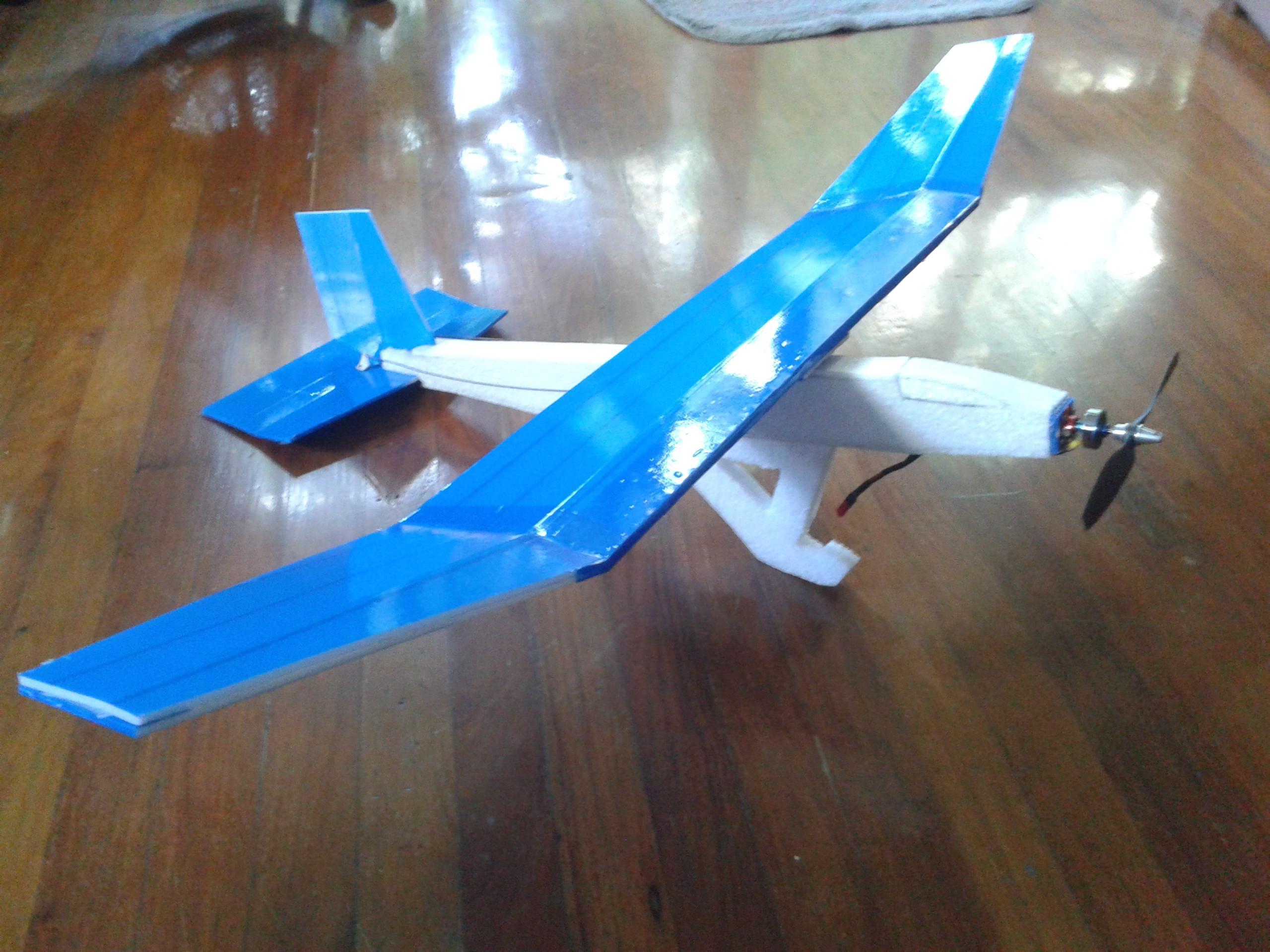
http://static.rcgroups.net/forums/attachments/4/2/0/1/8/3/a7093150-6-20140911_151549.jpg

OK Got the New Armin style wing on.

Compare to the Original EPS wing core thats 80g the Armin style wing is 130g , its 50g heavier for a wing of equivalent

but the results is better stiffer than the EPS wing core resulting in more Responsive Flying and stability . even on moderate winds.

http://static.rcgroups.net/forums/attachments/4/2/0/1/8/3/a7093158-200-20140911_151528.jpg

First flight with the new wing.

Note: done 1 day before the Storm and the winds are picking up. .

https://www.youtube.com/watch?v=swjki_4phHw&index=2&list=UUr8HxcdLWVlo-Rj2WV0yTSQ
https://www.youtube.com/watch?v=cfBEbBkh1LI&list=UUr8HxcdLWVlo-Rj2WV0yTSQ

BTW M I too high for a Parkflyer Radio? if so I think I have to change my RX

Read more…
Moderator

geneonagate-1024x678.jpg?width=450

Well done to Gene Robinson one of the first DIYD members. He has been pushing for this for years and it looks like the sun is rising on SAR RPAS in the USA.

Missing woman’s family hopeful as drones take to the sky

Brittany Feagans

After days of searching by foot, ATV and horseback have yielded no new information in the Aug. 30 disappearance of 23-year-old Christina Morris, the operation took to the sky Thursday after Texas EquuSearch got permission from the Federal Aviation Administration (FAA) to use unmanned airplanes to aid in its search effort.

Based in Austin, five waterproof drones are now on hand to take hundreds of aerial photos of the search area. Only one drone is launched at a time on 15-minute flights. When the aircraft – which takes about 150 photos every 10 minutes – lands, the images are removed, and the team moves on to the next area if necessary.


“The cruise speed on this aircraft is about 37 mph,” said Gene Robinson, director of unmanned aircraft operations. “It’s a relatively slow aircraft, it’s not the sexiest aircraft in the world, but it’s a very capable flyer. This is a groundbreaking use of this [specific] aircraft, and NIST was very gracious to allow us to use this aircraft on this search.”

The previous aircraft, the Spectra Flying Wing, is credited with recovering the remains of 11 people since its inception in 2005. The Spectra is an electric model, and the drones being used in the Morris investigation run on gas.

“It has an autopilot on board, and I’m the pilot in the loop,” said Robinson, who builds the drones for Texas EquuSearch. “There’s always a human in the loop, so if something goes south, I can flip a switch and it’s my bird. I’ve been flying these for about 35 years, and I’m a regular pilot as well.”

And while it’s typically Texas EquuSearch policy to prevent immediate family members from being present at search efforts, Ronnie McElroy, Morris’ stepfather, was there for the drone launch.

An aircraft mechanic at American Airlines, McElroy was curious about the drones being used to find his stepdaughter.

“Tim [Miller, founder and director of the mounted search and recovery nonprofit] is very into the search,” McElroy said. “The whole time [we’re driving around] he says, ‘We’ve got to find Christina.’ He’s a good guy, and I’m very glad we met him. He’s on a mission. He treats her like his own daughter.”

McElroy reached out to Texas EquuSearch after learning of his stepdaughter’s disappearance four days after she was last seen in a parking garage at The Shops at Legacy.

“Somebody knows something, and I’m just begging, to be honest with you,” said Jonni McElroy, Morris’ mother. “I’m a desperate mom right now. … I need people to start talking. I know in my heart that somebody knows.

“I’m making a plea. Please give her back to us. We’re not going to ask questions. We don’t care. You can go on your merry way like it never happened, but we need her back. You’ve had enough time with her. I know you want her with you more – who wouldn’t? She’s amazing, she’s beautiful and she’s the love of our life. There’s a reason why you took her … but hey, your time’s up.”

Emotionally drained and physically exhausted, Jonni will stop at nothing to find her daughter. She considered staying back to rest on Thursday, but seeing the drones and the support of the community gave her a renewed sense of hope.

“We’re blessed that the FAA is supporting us now too,” she said. “We obviously had to touch them some way or they wouldn’t have said yes. I understand Tim fought that fight, and he fought it hard with his team because he knows how important it is to find my daughter. We’re very blessed – I can’t stress that enough.”

By foot, horseback and ATV, volunteers will stop at nothing to get answers and find a woman many don’t even know personally.

“Our barn manager actually texted a bunch of us and asked if we wanted to come out [and help],” said Lisa Goldberg, an equestrian from Hidden Vale Stables in Plano. “I immediately broke my plans for the day and said ‘I’m there.’ I felt touched. I’ve been riding for 50 years … and I’m hopeful.”

Ronnie said he tears up everyday when he sees cars pull up to Legacy Church, the Texas EquuSearch command center, with food, water and supplies. The support from the community has played a big part in keeping him and his wife hopeful and focused on their No. 1 goal – finding Christina.

“It’s a true blessing,” Jonni said. “That’s God speaking. That’s the community coming together. We’ve got a lot of stuff going on in the world right now and this let’s you know there’s still hope and faith out there for sure. I thank my parents for always giving me a strong belief in God and faith and for carrying it through to my daughter.

“Somebody’s going to break. I know they are, because everybody’s born with a heart and soul. Everybody.”

For information on search efforts, visit texasequusearch.org.

http://starlocalmedia.com/allenamerican/news/missing-woman-s-family-hopeful-as-drones-take-to-the/article_e0fb6120-3adb-11e4-8a31-3b7ea5ee6fc4.html?mode=jqm

13962577258_ee3e6b83ce_b.jpg?width=400

http://www.suasnews.com/2014/05/29116/gene-robinson-of-rp-search-services-wins-first-annual-spectra-award-at-susb-expo/

Read more…

3689616046?profile=original

This is the first post in what I hope to be a series of posts on exploring the possibilities in using the Oculus Rift alongside a UAV. The plan in the long run is to create a GCS for the Oculus Rift or other HMDs that gives you a feeling of actually sitting up in the air being able to look around by just turning your head. Either as a pilot, copilot or passenger. Add to that the ability to control your UAV and interact with an augmented reality like maps for planning missions or guided mode and overlays giving information about your surrondings etc using for example a Sixense STEM or a Razer Hydra (Sixense TrueMotion) system. 

Anyway, here are the first trembling steps.

For some reason the embedded link doesent seem to work so here is a direct link

This is a really dodgy setup and the code right now is a mess. But here you can see my laptop connected to a PixHawk via mavlink running arducopter 3.2rc9 (yeah its a clone, but there wasn't any originals available in Sweden/europe when I needed one). Received MavLink data is displayed in the Oculus, though for now I only have GPS status, sats, hdop and attitude roll displayed in the Oculus so there is a lot of work to do. To know which way is straight ahead a green cross is displayed in oculus. The application then takes tracking data (roll, pitch, yaw) from the Oculus and assembles MavLink messages at a 50Hz loop that are being sent to the PixHawk to control the gimbal. The gimbal is controlled with an Alexmos 8bit SBGC. As you can see the gimbal is not very well tuned. The cables from the webcams are really stiff making it very hard to tune. Also a smaller gimbal with less inertia on the roll and yaw axis will probably be more suited to the task but this is what I had at home. 

Image is delivered from a Microsoft LifeCam studio webcam captured with direct show. Only one camera is used since my laptop refuses to capture two at the same time. Though on my workstation I can use both cameras along with the Oculus which is really cool. I can also use a Hauppahuge USB Live2 capture card to be able to use a analog camera with a wireless link. The image is really crappy though. My plan here has been to use two webcameras and a Odroid and stream a stereo video over 4G/LTE network using h264 low latency encoding. So far though I have not had much time to look into this. Maybe a DTV link using a Hides DVB-T dongle or a Aires Pro 5.8GHz link would better.

Right now I will continue to work on cleaning up the code and the HUD and hopefully I'll manage to do a test in the air soon.

Read more…
3D Robotics

Pocketcopter project on Indiegogo

3689616189?profile=originalIt looks like they've still got a lot of work to do to make this Pocketcopter a reality, but it's a cool idea (I've backed it):

How does the Pocketcopter work?

The Pocketcopter itself is powered by a 12V battery (rechargeable or replaceable) and is controlled via the touch screen of your smartphone.


The connection is via WiFi (similar to the remote control of the GoPro) or Bluetooth.
Due to the fact that, although the rotor arms are fixed one above the other, each spins in the opposite direction to the other thus achieving stability
 and ensuring quiet recordings.

Should the Pocketcopter lose the connection to the smartphone it automatically floats slowly to the ground.

The software interfaces will allow the pictures or videos taken to be instantly shared directly on social networks like Facebook, Twitter or Instagram.

20140802031340-this2.jpg?1406974420

Specifications

  • Height about 19 cm
  • Diameter about 4.5 cm
  • 12V rechargeable
  • 3D HD camera
  • Range about 10 meters
  • Rotor blades removable
  • Previous tests showed that the running time of a fully charged battery is about 6 hours (camera) and 25 min flight time.
  • Storage Medium: Micro SD card

Blue, Yellow and Black

20140802122508-colors.jpg?1407007508

Read more…
Moderator

Now that Tony Cairoli can fully enjoy about the newly conquered eighth world title in Motocross, Red Bull can reveal some details that have contributed to the success. Here's one: about a year ago, the team of the hugely popular energy drink has involved our Team to create a telemetry system (baptized then Connected Rider and proved an excellent device, almost to Formula One) for use during workouts Tony , to track its performance and uncover the secrets of his guide so unique riding his KTM 350 SX-F.
This is an example of tool used during the data analysis and algorithm implementation and  debug support the video sincronization with raw data from the telemetry device:) 
 
Best
Roberto 
Read more…

3689616157?profile=original

Thanks to our magnificent US allies at Edge Research Lab, we're able to offer a couple of exclusive ringside seats to the forthcoming launch of our Low Orbit Helium Assisted Navigator (LOHAN) mission, including a light aircraft flight as the ballocket payload (seen above with apprentice boffin Katarina) rises majestically above the desert.

Our Kickstarter campaign to take the Vulture 2 spaceplane flight to Spaceport America looks like its going to hit its target, so if you've got a few bucks spare, and your liver can handle it, consider joining us in person for what promises to be an entertaining experience.

There are more details here. If your schedule or your wallet don't stretch to a VIP pass, join the other DIY Drones members who've already generously chipped in to support the cause. We'll be inviting all backers to a shindig in Las Cruces when we arrive, and will bring you details of that in due course.

Read more…

An AutoPilot in the Clouds - part 2

3689615980?profile=original

In part 2 of this blog, I take closer look at the communication protocol, range guard and state machine of the autopilot. As with part 1, this blog post is for those who think developing drone software is interesting and would like to know some of the thoughts that have gone into making this particular system.

Some may ask why one would go through the trouble of taking the autopilot off the airframe, when it’s been sitting there happily for so long. The simple is answer is, interconnecting is more fun!

A long time ago, we had personal computers but no internet to share data through. Data had to be transported on floppy disks and magnetic tape. Facebook, twitter, Online multiplayer gaming, email and a zillion other things were not practical without the connecting abilities of the internet.

In the old days, the first power plants were only serving a few local businesses with no way to handle sudden break downs etc. Today we have connected state and even countries through our power lines to be able to sell electricity or cope with breakdowns on the grid.

In short - we tend to want to connect solitary systems, to make them more usable.

Thats why I find this project fun. By making the autopilot a central entity, that is connected to multiple drones, the possibilities of what these drones can achieve together are endless. See it as a low-cost, hobby experiment - exploring what such systems could do for us in the future or as an alternate to the APM type of autopilot.

Another advantage is the possibility of running the autopilot of a laptop, where modifications are easy to do during flight tests and no expensive hardware is damaged, should the craft to self destruct.

Finally, this system is versatile in the way that it connects to its surroundings, so if you’d like to have the autopilot stay in the airframe, it simply stays there and connects through the serial port… 

The protocol

The system relies heavily on constant communication with the drone. The drone sends a lot of telemetry metric back to the autopilot, which the autopilot in turn interprets and react to, sending back correctional data to make the drone achieve it’s mission. Stability is handled locally on the drone by a modified multiwii and it is therefor only correctional data such as throttle, pitch and roll that is sent back to the drone. 

As we want to be able to control as many drones as possible, with only one radio link, the communication protocol has to be as efficient as possible, meaning, don’t include data that is not needed and send it as compact as possible. 

I’ve not optimised this to the fullest but sending data to the drone only takes up 8 bytes - these are:

[Start data byte] [Drone id byte] [ROLL] [PITCH] [THROTTLE] [YAW] [Checksum] [Data done byte]

Start data byte simply indicates that a transmission of data is about to begin.

Drone id byte indicates which drone this data is intended for.

Roll, Pitch, Throttle and yaw are the native values that multiwii uses normally as input from an RC Radio and is normally a number ranging from 1000 to 2000 (PWM Cycles). A byte can only describe the range from 0 to 255 or -128 to 127. The values are therefor divided by 10 before sending, and multiplied by 10 upon reception. We loose a little precision only being able to send values in the increment of 10, but thats acceptable.

Checksum is a control byte that is calculated from the previous data - as this checksum has to be computed fast on the receiving embedded system, I choose to use a simple xor checksum. This will still be a pretty good error prevention mechanism, and should faulty values come through, the autopilot will correct them on upon the next telemetry update.

Data done byte signals the end of the data packet.

Should the checksum or number of bytes between start byte and end byte be wrong, the transmission is discarded. 

RangeGuard

As with the usav (android based autopilot), the system features a range guard system, that acts independently of all other systems. If the drone gets higher or further away than whats allowed, it can either land the craft or turn it around regardless of what the craft is doing. Internally this is handled by the state machine, that ensures that the proper transitions are made from what ever state the craft was in when the range guard was activated.

The State machine

The state machine control the basic actions of the system, and makes sure that things happen in the correct order. While testing auto takeoff and landing, the state machine is configured to simply go through the preflight check, wait for the auto takeoff command, execute the auto takeoff and immediately issue the auto land manoeuvre once auto takeoff has been carried out.

In blocks, the configuration looks like this, where non transparent arrows shows automatic transitions and transparent represents user determined state changes.

3689616030?profile=original

A state consists of a number of things. 

Condition dependencies - A state is not allowed until some conditions are fulfilled. ie. preflight state is not allowed until we have solid telemetry (gps fix etc..)

Allowed pre-states. A state can only occur if the previous state is on the list of allowed states. This makes sure that you cannot land before you’ve actually taken off. Or that you cannot go into preflight whilst in the air.

State precode - Any code that will prepare the system/craft for the coming state.

State main code - The code that is to be executed once the state is effective.

State post code - Any code that should be executed when leaving the state

Auto advance to next state - Indicates if the state should automatically advance to another state once the state main code has finished.

Below is a block example of the preflight state.

3689616110?profile=original

The state machine is easily configurable which means that it will grow to something like this, once more testing has been done. The state machine will most likely contain a free flight state, where the user is able to control the craft directly using an app.

3689615989?profile=original

As you see, the range guard system is fully independent state, which will be triggered if the craft get too far away, and will disable any current activity and switch to auto land.

Next time

The system relies on predefined maneuvers. The maneuvers can either be very simple (turn right) or pull on telemetry data, include logic etc, as is the case with the auto takeoff maneuver. I'll show some examples.

Also, some graphs and logs from flite testing.
Read more…
Developer

APM:Plane 3.1.1 released

3689591584?profile=original

The ardupilot development team is proud to announce the release of version 3.1.1 of APM:Plane. This is primarily a bugfix release with a small number of new features.

The main bug fixed in this release is a bug that could affect saving parameters and mission items in the FRAM/eeprom storage of PX4v1/Pixhawk/VRBrain. The bug has been in the code since January 2013 and did not cause problems very often (which is why it hasn't been noticed till now), but when it does happen it causes changes to parameters or mission items not to be saved on a reboot.

Other changes in this release:

  • support for using a Lidar for landing for terrain altitude (see the RNGFND_LANDING parameter)
  • improvements in the landing approach code, especially the glide slope calculation
  • added LAND_FLAP_PERCENT and TKOFF_FLAP_PCNT parameters, to control the amount of flaps to use on takeoff and landing
  • the default WP_RADIUS has been raised from 30 to 90. Note that the L1 controller may choose to turn after the WP_RADIUS is reached. The WP_RADIUS only controls the earliest point at which the turn can happen, so a larger WP_RADIUS usually leads to better flight paths, especially for faster aircraft.
  • send gyro and accel status separately to the GCS (thanks to Randy)
  • support setting the acceptance radius in mission waypoints (in parameter 2), which allows for better control of waypoints where actions such as servo release will happen
  • fixed GPS time offset in HIL
  • added RELAY_DEFAULT parameter, allowing control of relay state on boot
  • fixed sdcard logging on PX4v1
  • added GPS_SBAS_MODE and GPS_MIN_ELEV parameters for better control of the use of SBAS and the GPS elevation mask for advanced users

Happy flying!

Read more…
3D Robotics

From the 3DR blog:

On Tuesday, 3D Robotics announced that we’ve partnered with Intel in the development of Edison, a new microcomputer that basically gives you PC power in postage stamp size. We’ve worked closely and for a long time with Intel on this project because the combination of Edison’s incredible power and  affordability will lead to truly revolutionary advancements for our company, and for the Internet of Things in general.

  • The Intel Edison module uses a 22-nm Intel® Atom™ SoC, formerly Silvermont that includes a dual core, dual threaded CPU at 500 MHz and a 32-bit Intel® Quark™ processor MCU at 100 MHz. It supports 40 GPIOs and includes: 1 GB LPDDR3, 4 GB EMMC, and dual-band WiFi and Bluetooth® Low Energy on a module the size of a postage stamp.
  • The Intel Edison module will initially support development with Arduino* and C/C++, followed by Node.JS, Python, RTOS, and Visual Programming support in the near future.
  • The Intel Edison module includes a device-to-device and device-to-cloud connectivity framework to enable cross-device communication and a cloud-based, multi-tenant, time-series analytics service.

The Edison board has the kind of processing that at one time you could only find in a personal computer. This means that when we integrate Edison into our next-generation autopilot, we’ll be able to make incredible leaps forward in on-board image processing, sense and avoid, new classes of sensors, and artificial intelligence, with many more eggs yet to be discovered and cracked open. The technology is now here. The challenge now is to start doing important and interesting things with it.

For instance, for the big announcement on Tuesday we ran a demo of IRIS+ using an “optical” version of our 3PV™ Follow Me technology, with Edison as a companion computer to our Pixhawk autopilot. That sounds way too technical. But what that really means is that with the extra computing power from Edison, 3PV™ can now track people and objects with vision instead of relying on a GPS signal, so you won’t need to carry another device on you anymore—you can just go and the drone will visually recognize where you are and keep the camera on you. 3689616080?profile=original

3DR CEO Chris Anderson called the partnership, “A rich collaboration between Intel’s engineers and ours to integrate the Edison into our platform and add image processing power.” For Chris, Edison unlocks what you might call “the long tail of drones.” In other words, drones won’t come in a handful of sizes and models with a handful of universal capabilities, as they do today. Instead, drones will be customized and adapted, changed and invented and reinvented to meet an untold number of needs and solve an untold number of problems, most of which we aren’t even aware of today. That’s the long tail. With additional computing power from Edison, 3DR will build drones that can do more things for more people in more industries, and eventually drones that can be infinitely tailored to meet the many unique needs of the real world that are out there now, waiting for their applications to come along.

Read more…

Quadrotor indoor position control

This large video is about the project that Murray and me have being doing in the MAST Lab. It's about doing automatic position control and trajectory tracking of a micro unmanned aerial vehicle, being more specific is our 3D printed quadrotor platform, called TEGO, showed in previous posts here and here.

The video explains almost straightforward what we are doing, but in a simple way, we are replacing the human pilot with a computer controlled one. The "artificial pilot" receives the very precise position of the markers onboard TEGO coming from the motion capture system and it computes the commands necessary to make those markers move to a desired position. Pretty simple and easy right? well... it its not! I'll continue explaining part by part of the system.

  • Motion Capture.

We have a Optitrack system with 18 cameras, we have the Flex 3 ones, so, nothing too fancy, but for now, they are doing the job. The system is tricky to make sure is working perfectly, and usually the cleaning staff knocks one stand and then we have to do the "rain dance" over and over again, kind of stressful, in the pictures you can see using the interface from Natural Point the position of the cameras while tracking markers.

3689615937?profile=original

  • TEGO quadcopter

Our trustworthy platform, 300 grams with battery, 7-8 minutes of hovering, SK3 3100kv 42 watts motors, 10 amps ESC, 5x3 props, Rotite's included on the frame.

3689615783?profile=original

  • Flight controller

Multiwii AIO v2, using MW firmware r1648 with Alex Kroroshko experimental PID algorithm, everything else is standard, rate = 0.9 and expo 0.3 for pitch and roll. I have to mention that I have received lots of help on the MW forums, so, thanks for that guys!!!

  • Wireless link

A pair of good old 3DR radios using a special firmware adjusted for the multiwii serial protocol (Andrew Tridgell's SiK telemetry radio software for MultiWii). Oh and by the way, how cool is Andrew Tridgell!!! he is revolutionising everything, take a look at this awesome video. This radios are working at 115,200 bps, but we think that we might have a bottleneck problem while sending commands, maybe we just need more speed to achieve the trajectory tracking performance that we want...

  • Ground Station

Matlab / Simulink, also you can see some pictures of the diagram and you can see it in action on the video. Why Matlab?? because we have a very convenient block for optitrack that makes our lives easier. We know that simulink is not famous with its performance when doing this kind of stuff, but it kinda does the job. Special thanks to my students Krisjanis and Davide for helping in the implementation of the MW serial protocol in simulink :) you rock guys!!

The system is not perfect, we want to have a perfect performance, rock solid. But we don't have it quite yet, we are closer though. In the making and tuning of this system Murray (my teammate and amigo) and me we have suffered a lot and even bleed lots of times, my thumb especially... Lets say I have less sensibility now :(. We were implementing a simple PID control in simulink because our original state space control was not working correctly, but now that we change from the standard MW PID to the Alex Kroroshko PID one; the state space started to work better, and is the one we are using right now.

In the next picture you can see some of our blackbox plots, especially on that flight we tried to perform a eight trajectory, its actually improving... take a look:

3689615955?profile=original

3689615900?profile=original

I would like to have some feedback from everyone and of course some opinions or ideas of how to make this one better... I have to excuse for the video, because is very large, but this is not a video to just show stuff, I want to demonstrate almost everything about our system.

3689615951?profile=original

Keep on flying!

Read more…

3689615812?profile=originalLinus Penzlien has been working on a hardware-in-the-loop simulation for our Vulture 2 spaceplane, using an X-Plane model of the aircraft by Billy Bargagliotti. During testing Linus managed to hit 630km/h, which he nicely described as " very fast".

3689615757?profile=original

It's good stuff, but here's still more HIL, and indeed SITL, excitement ahead from Linus and Andrew Tridgell. There are details on the work to date here.

In the meantime, we wish Tridge and the CanberraUAV team well in the forthcoming UAV Challenge.


Read more…

3689615865?profile=original

After after almost 9 months of application of the SurVoyeur MKII UAV system in the Etosha National Park here in Namibia, The Park and Ministry have added further to their capabilities. Two more Pilots have also completed there training this week, each on both the SurVoyeur MKI and MKII systems. This will enable the Park to fly simultaneous flights in separate areas, day and night if required. The fully automated systems have day and night ( Thermal) imagers and the full autonomy in launch, flight, target designate and track, as well as autolanding, ensure the best survivability in this harsh environment.

Pilot effort in flight control and management is also vastly reduced, a huge plus in the National Parks.

The preceding 9 months of system use has shown many successes and preemptive flights have been shown to act as strong deterrent to would be undesirables, leading to the latest additions.

Congrats to the two new Pilots , Shayne and Isaskar, and their new systems!

Nampilot.

3689615882?profile=original

3689615842?profile=original

3689615770?profile=original

3689615910?profile=original

Read more…
3D Robotics

The AP Manager looks great! I've backed it. 

Improve your flight-safety by adding redundancy with the intelligent bridge between two independent running autopilots in your RC-model


Universal, reliable, flexible, future-oriented, this is the AP-Manager.

Designed for the use of two independent running autopilot-systems in your RC-model.

For safety reason and testing purposes.

A must have for the serious commercial or private RC pilot and a step forward to a secure flight for you and your RC-model.

NEW: Extra feature for TRANSFORMER UAV (e.g. multicopter --> aircraft and back)

20140708044955-1.png?1404820195

This is the AP-Manager

How it works?

Different configurations

What is included?

What is coming next?

Technical Specification

Where will Fundings go?

Risk and challanges

FAQ's


This is the AP-Manager:

The requirements for the operation of unmanned aircrafts in commercial and semi-professional purposes have changed fundamentally in the past years in Europe and worldwide. ( FAA ) The regulations will get even more strictly in the future.

Depending on the application, the weight, the purpose, the situation, the flight area, spectators and some more reasons, SAFETY is becoming increasingly important.

Single point of failure and redundancy became the keywords for permissions and certifications from authorities and insurances.

Among other parts inside a system, redundancy of the autopilot system is meanwhile mandatory to follow the rules. Especially multicopters are very instable in their flight characteristics when it comes to malfunction of the stabilization system.

We therefore developed a redundancy circuit board which is an automatic monitoring and controlling bridge between two independent running autopilot systems, a mutual protection in case of malfunction in an autopilot system. Even if both autopilots fail (power supply, freezing controller…), the forwarding of the control signals for a manual flight of the aircraft, Delta or Helicopter is guaranteed.

This system also offers the possibility to switch manually between two different autopilot systems to test different software and sensor setups. Another benefit of the AP-Manager is that only one telemetry module is needed to monitor data of both autopilot systems (except for DJI autopilots, here you need two downlinks, from each autopilot seperate).

AP-Manager is a safe attendant for flying and testing of your unmanned aircraft.


How it works?

AP-Manager provides the best safety for your aircraft, in case of malfunction in one autopilot system. If the primary autopilot system fails, the AP-Manager automatically switches within fractions of a second to the secondary autopilot system.

However, the switching can also be done manually by remote control. Hence the AP-Manager is the perfect companion to test the most recent updates or new parameter upgrades for your autopilot system.

Due to an intelligent control system, only one telemetry module is required (except DJI autopilots). The Data of each autopilot system can be monitored and changed during the flight separately. In addition, different types of autopilot systems can be operated alternately. AP-Manager is compatible with any autopilot system. The only requirement to an autopilot system is that it produces a periodically recurring signal like I2C communication or CAN bus to determine the state of health.

Currently, the autopilot systems:

  • Ardupilots 2.5 / 2.6
  • PX4
  • Pixhawk
  • DJI NAZA V2
  • NEW: DJI A2
  • MikroKopter Flight Ctrl ME 2.1

have been tested successfully.

Basically there is no reason that other autopilot systems from other manufacturers won’t work. The board has been designed that all ports are compatible with the common used autopilot systems.


Different configurations

20140615111841-Gruppenbild_Einbauarten_AP-Manager.png?1402856321

NOTE: No designates orientation for the AP-Manager is needed


What is included?

20140717031304-Bild1.png?1405591984

20140723031108-Softwarebild_b.png?1406110268

  • AP-Manager Board
  • straight 3-pin header rows
  • User Manual (online for download)
  • Software (online for download)
  • ...

What is coming next?

It is not possible for us to test all possible systems and setup configurations combined with all variations of vehicles. For this reason we offer our ongoing adaption of the software to the wishes of the customers. The desires, priorities, or problems of the customers will be analyzed in a discussion forum to adjust and improve the AP-Manager and its software.

For the discussion forum check our website: www.GIZMOtec.eu


Technical Specification:

20140615130822-4-Seitenansicht_AP-Manager.png?1402862902

  • Width: 40 mm
  • Length: 65 mm
  • Drill hole distances correspond to APM 2.5/2.6, as well as PX4 and Pixhawk
  • Weight: approx. 20g
  • Temperature range: 0°C to +50°C (32°F – 122°F)
  • Supply voltage: 5V (+/- 5%)
  • Separate or external servo power supply possible (for example, for high power servos)
  • PPM Input and decoding in PWM for 8 channels
  • (16 channels with a second AP-Manager board in preparation)
  • ...

Read more…

My pneumatic launcher

Hello,
I show you my pneumatic launcher for my skywalker X8.
Why a pneumatic launcher ? Because I think it's a funniest idea than a bungee launcher et technically more interesting.
It's works like the mini uav launcher system.
Air tank -> QEV -> air cylinder -> pulley -> trolley -> airplane
A 12V pump pressure the air tank with a lipo battery in few minutes.
The launch thanks to a pedal which start QEV.
All part are homemade with my mill machine


Cédric Siou


Read more…

Custom built APM mini quad.

3689615518?profile=original

Just want to share my scratch built FPV quad made with my new CNC machine :) Called "the butterfly" name picked by my Fiance 

This was my first CNC project I gave myself.. It has been a great learning experience learning all the different techniques required to design, and translate that design to a finished CNC'd product.

I wanted to make something very forgiving in crashes for teaching my friends, full featured flight controller, and capable of FPV flight. Just a pure training and fun flying helicopter.

The length of the quad arm end to arm end is 17 inches (including prop guard). I do not have an exact weight, but I can say it hovers at 40-45% throttle and has a flight time of 10 min. The arms are tilted inward 10 degrees on each arm to improve stability. The motors are mounted upside down to avoid prop-wash hitting the arms and creating drag.

The gimbal and video has not been tested as I'm still waiting on the video transmitter and rca-usb video input for tablet to arrive. The plan is to fly it from my surface tablet using a usb hub for video and data radio Tx. I also plan to design a small box for an antenna tracker. There is no traditional Tx/Rx used to control this copter.. It's all done through the data link. Flying this way took a little practice, but it's very nice using the PS4 controller's joysticks. This also helps save a little weight and frame real estate. There is no lag at all between my controller and the heli.

Crash durability has been extensively tested.. The frame is very forgiving in crashes. After many small bumps with objects, crashes, and even being stuck in a tree the props have not even the slightest nicks on them and no broken parts.

Overall I'm happy with the frame. The flight controller is giving me a few issues however. GPS positions jump allover the map frequently, and altitude hold is sketchy at best. I currently only fly in stabilize mode. I'm using the miniAPM flight controller.

3689615343?profile=originalOpinions and thoughts welcome.

Read more…

I would like to share my latest project with you guys, Above is a Short video montage I made.

If you would like to build one, here is the link to my build log that I made:

http://explorer4-quadcopter.atwebpages.com/

I originaly wanted to buy a TBS disco pro but when I priced up everything I would need I came to quite a shocking amount. I also wanted to use Arducopter purely because its great!! which the Disco pro isn't designed for.

I have already built copters before and am able to CNC cut carbon sheet, So I thought to myself Why not DIY. I priced up all the parts I would need from Hobbyking and Himodel and started planing. This is the result:

3689615556?profile=original3689615507?profile=original

The quad itself costs about 500€ excluding the TX and Gopro, which is quite a saving. I also designed the frame with a dirty/clean setup, The middle section of the bottom plate is on rubber dampeners, the Flight controller, Brushless Gimball and most importantly the battery are on this plate. This setup drasicly reduces the vibrations on the flight controller and gimball, mostly due to the mass of the 5000Mah Li-po.

3689615581?profile=originalAbove: Vibrations Log data

Overall I am really happy with it, Its so easy to fly thanks to the hybrid mode of arducopter and this being my first pure FPV model has made that step alot easyer. The Flight times are great too, I normaly land at about 15 mins after FPV "exploring" and there is normaly about 25-30% still left in the battery, I have had a flight in loiter mode just hovering and I got up to 20 minutes before the failsafe kicked in. There is also no problems with jello on the gopro or fpv cam, which was one of my main worries.

Specs:

  • Weight: 1725g without gopro.
  • Width (motor axis): 44cm
  • Length (motor axis):27cm
  • Length of body: 32cm
  • Props: 10×4,5 carbon fiber
  • Flight time: ~20mins hover or ~15mins fpv flying.

I made Build videos as I built it and have shared them at the link above, there is also a full parts list on there with links. If you like the idea and want to build one for yourself all the info you need is on there.

Let me know what you think!

Read more…