All Posts (11086)

Sort by

Photography Drones: Robot Cameras Take to the Skies

Read more…
Moderator

3689522510?profile=original

Here's a clip from the Korean Broadcasting System's "World Today" program on the state of civilian dronism in the USA.  3DRobotics, EastBay RC, and the Roswell Flight Crew make appearances.  Protesters, law enforcement officers and lawyers weigh in with their opinions (bad, good, profitable, respectively).

It may be informative if you know Korean.

The clip is used by permission of KBS.

3689522431?profile=original

Read more…

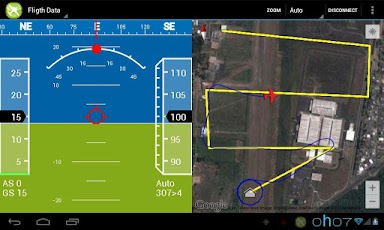
It has come to my attention that people are not noticing this amazing app that is being produced for Android to give full missionplanner functionality and more using Mavlink to your UNMODIFIED android device

sveD_QnMVCcbY90uEmIOO3LhAWSa2QuN69FFe-TkjavvWSL0gTW-7L_OdHUHL1ZI-w=h230

Features: Follow Me (If you device has GPS, you can set your plane or copter to follow me and it will circle or hover above your point or trail behind you as you run for it :)

Parameters (Droidplanner has a Parameters screen which allows you to correct your parameters in flight from your android device, no laptops to lug around!

Accelerometer Calibration Droidplanner has Horizon calibration to allow you to calibrate your copter in the field, which can be a life saver if you go miles to fly and find the horizon is off.)

Flightpath Planning  Droidplanner Offers the ability to program your way points onto google maps with options for default altitude and more, it is very user friendly and works well!

Remote control Aircraft from app.  (This app has a very special feature which allows you to Control your model from the app using a touch screen interface, this means if something went wrong and you could not use your controller, or you have a friend who wants to try flying but do not have a buddy system, you can use this feature to control your Model!)

Remote control Camera Gimble (A feature unique to Droid planner allows you to control a camera gimple plugged into the apm from the App, this means rather than buying two controllers or modifying your controller to add extra control for the camera, simply switch to camera control and you have full ability to adjust the camera position as you like.)

Live Horizon and Map view with telemetry data  Switch to the flight data Tab and have full telemetry view with vocal alerts, Altitude Number of sattelites, position shown on map, Airspeed and ground speed, level and more.

These are some of the Prominent features of Droid planner, but there is so much more!.

If you want to know how to connect the MAVlink dongle to your android device it is very simple, you need to buy a chep usb to micro usb (depending on your device) adpater from somewhere like ebay or amazon, plug the one end into android device, the other into the MAV link and thats it!

Check it out, completely FREE 
https://play.google.com/store/apps/details?id=com.droidplanner

(update by mh)

You need aUSB OTG cable.

List of compatible Android devices.

(end update)

Read more…

Big Product News

3689522368?profile=original


3DR Hexacopter to Y6 conversion kits are now available for less than $50.

A Y6 design is able to withstand a single motor out scenario (see above), provides a more open and stable view for cameras, and doesn't weigh as much as a traditional Hex because it uses less parts.  We've come a long way in the last couple of years...

3689522461?profile=original

Those of you who have been with us for a while will remember our original ArduCopter kits.


I bought one, as I know many of you did.  Mine is now hanging on the wall; a reminder of something that fueled obsessions, and made me think of new possibilities in life.  That spirit is in many of us here at 3D Robotics, and is clearly evident in this latest offering that we are able to provide our customers.

Joe, our primary flight-ops engineer in San Diego came to us one day with a Y6 that was converted from one of our existing Hexacopters.  Within a few weeks the amazing design and production team at 3D Robotics had created an inexpensive, custom tailored kit to convert our existing Hexa into a Y6.

I've personally done the conversion, and it takes about an hour.  It's very straightforward.

This is fantastic news, but it gets even better.  Throughout our ongoing expansion we are highly focused on quality documentation and improving ease-of-use.  In that vein, Alex--our new technical writer-- created an AWESOME set of instructions for the new Y6 conversion kit. 

Not only do we have the kit, and instructions, but we also have a tuned parameter file to get you up and navigating smoothly to over 150 waypoints that APM supports out of the box.

This is a huge step forward for us as a company, and demonstrates our commitment to provide our customers with high-quality, easy-to-use universal autopilots and aircraft.

We hope all of you Hex fliers out there appreciate this kit as much as we do.  All of our traditional hex aircraft have been or will shortly be converted to the Y6.  It flies like a dream.

High-fives for Joe and Alex!


Read more…

HD video for UAV's

3689522281?profile=originalI keep asking myself why this cannot be done, and so far i have not found an answer i can believe. So i bought a commercial HD Video/Audio sender for home use and plugged in my gopro as a video source, and my flat screen TV as the player, and i connected up these devices and viola..! it worked. So my next thought what is the problem with making this work in a UAV , it is using 5.8Ghz it is cheap to buy, just need to hack it so the antenna is less directional, and we can then have HD in our goggles, or on our screen.

This would be far more preferable to me for a first time FPV flyer as the picture is so poor at 480x240 pixels, you can hardly see if your moving or not.

What do you all think? i know a more elegant solution would be nicer but for now it would work.

sample of what i meant : http://www.maplin.co.uk/wireless-hdmi-video-sender-kit-503801

Read more…

Delta Wing Mixing For Newbies

Delta Wing Mixing 101

3689522308?profile=original

As a lot of newbies to delta wings often ask the question "Why is the mission planner not doing the necessary mixing for my servos to just work?" well for the stabilize the mission planner will work but not for manual and that is where the problem comes in because you need to lift of in manual and if your remote is not configured correctly your plane will just crash.


Lesson 1 : Never think inverting channels will fix anything.

If you mix your channels correctly life will brighten up, for delta wing mixing you have the following:

You will notice that you have CH1 and CH2 and there is 100%'s and +'s and -'s and its all very confusing and it gets more confusing once you notice that each channel has elevator and aileron defined.


ok lets start


  1. You have channel 1 and 2 because you insert your servos into channel 1 and 2.
  2. You have aileron and elevator because these 2 servos does both its called elevon.
  3. The % defines how much the servo goes forward and backwards (in most cases you do not want 100% for that will strip the gears of cheap servos)
  4. The 2 plus signs defines that there are two or more additional functionality to the channel
  5. And the minus well both % can go positive or negative


Scenario 1 : Elevator and aileron moves up and down together no matter how I move the sticks

Solution :  This because all of the % is either negative or positive only the elevator must be the same.


Scenario 2 :When I move the aileron stick left and right the elevons move independently up and down and when I move the elevator stick up and down the elevons move together up and down, but the when I move the elevator stick down the elevons move down where it should go up.

Solution : If both elevators is in a positive percentage move both elevators to a negative percentage and vise versa.


Scenario 3 : When I move the aileron stick to the left the left elevon down and the right elevon moves up.

Solution : Change the aileron % to the opposite polarity so if CH1 was negative %, change it to positive % and vise versa.


The following 2 points is very IMPORTANT.

  1. The elevons needs reinforcement if it is made from epo foam but not too much it needs to be really flexible.
  2. When you move the aileron and elevator to their max and the piano wire starts bending, your % on the mix is to much, tune it down till the piano wire does not bend any more. 


Hopes this helps a lot of people.


Read more…

Thirty Days (#10): Seeking zero % failure

3689522235?profile=original

Looking for failure is a bittersweet endeavor -- it goes against human nature to look for something that we don't want to find. Our in-house process improvements are bringing us closer and closer to the goal of zero failures. Some days everything we make is perfect, but when it's not, our job is to find the fault before it gets to the customer. These new gimbaled test jigs run every APM through a rigorous test cycle to validate its performance. In addition, we are constantly working on things like paste handling, material inspection, plus the addition of other super-bad-ass expensive machines that do stuff.

3689522255?profile=original


Read more…
Developer

MAVLink 1.1 Request for Comments

3689393223?profile=original

RFC post here. After more than one year of service, the MAVLink 1.0 spec needs an update to 1.1 to adjust for developments made on autopilot platforms (new messages) and to clarify and improve some aspects of the protocol. In contrast to the upgrade from 0.9 to 1.0 the intent is to make this a 100% compatible update, so that autopilots and ground control stations can benefit from the new functionality, but won't be left behind when not immediately upgrading.

This post is mostly directed at interested users and implementers and make the general public aware that protocol change proposals should be handed in now.

Please register for the mailing list in order to be able to post.

LINK TO RFT POST

Read more…

This is a continuation of yesterdays post Introduction to Gigglebots and demonstrates the hardware setup of my soon-to-come software.

3689522145?profile=original


This is my full setup for my UAV with full video and telemetry, and steering. I have kept the number of pieces of hardware required to an absolute minimum by utilising all the sensors, cameras and communications from Android phones.


The software talks directly to a MultiWii, and I'm working on a MavLink version, it can also integrate with a microcontroller such as Arduino (by Serial over Bluetooth, or USB on-the-go).


All servos and ESC are configured in the Gigglebots controller software, and has options for servo center, limits and trim buttons. Each servo/ESC can also be assigned a role, such as steering, elevation or throttle. If you so desire you can set exponentials and servo mixing here too. For more complex behavior each channel could also be assigned a mathematical expression to follow.


3689522178?profile=original


The RC input screen lets you configure which pins are for PWM input, and what roles they have. Once you have selected these, the program talks to you and asks you to do things like (“push the throttle forward”, “move the rudder to the left” etc) and configures everything for you. No more worrying about reversed channels.


Once all channels are set up, you can view their positions and roles on the main channels screen...


3689522219?profile=original


Gains are handled on a separate screen, and all the uncertainties of PID loops have been done away with, in favour of just 2 parameters, Turn Rate, and Straighten. Turn rate tells it how much to turn, Straighten controls when it starts to straighten up again.


More to come soon.  Please check back, or follow me on Twitter.


Read more…

36674.jpgThe Q-Brain incorporates 4x 20A speed controllers in 1 device. All motor leads are pre-installed and are terminated with 3.5mm bullet connectors. Leads are 25 cm long which means that you can use this controller with frames up to 60 cm. It operates on 2-4 cells lipo and 5-12 cells Ni-XX (anyone still using these). Refresh rate is over 400Hz.

Weight of the speed controller is 112 grams and dimensions are ~70x62x11 mm. The Q-Brain is probably very similar to the Hobbywing Quattro ESC.

Advantage: Easy install

Disadvantage: If one of the esc's dies you can't use it with a quadcopter anymore (get a tricopter!)

More information on the Hobbyking site

Note: If you are using the Q-Brain with a KK2 board, then S3 (the white cable) has to be connected to M1 on the KK2 to power it.

Read more…

Sneak peek at mavboard progress

3689522069?profile=original

I've been working on a custom circuit board I am calling the "mavboard" which will be a board that will distribute telemetry connections to various other devices, and allow you to select which port gets the telemetry Rx pin, since only one thing can talk *TO* the APM telemetry port. All other mav ports can sniff the APM Tx pin.

As you can see in the images below, I went a step further and embedded an ATMega directly into the board as well. My vision for this board is not just a "Mavlink Hub" but also a protocol translator for a couple of popular RC Rx devices that offer telemetry options such as FrSky and OpenLRS. What I have working so far is the FrSky conversion originally based from JDrone's jD_IOBoard_FrSkyMAVLink project with refactoring and bug fixes from Vito Ammirata. We have been discussing and making progress over in This Thread and his updated code has been put into GitHub.

When done, all the board design files and schematic will be available for download. The initial prototype is using a number of through-hole components which I would like to switch out to SMD so the board can be smaller (shooting for size of MinimOSD), but I am still exploring options for how to get a small number of SMD boards stuffed without having to hand solder all the components. If interested, I may offer some up for sale so I can get a batch of them made.

3689522106?profile=original

3689522081?profile=original

Read more…

DIYDrones Chat Feature Info

(We removed the Chat Feature until we can integrate it onto the site without causing Page Loading time delays and any user errors!  I'm going to work with Ning tomorrow afternoon on trying to fix the chat so that it doesn't affect any of our users.  If that doesn't work we can either wait 1-3 Months until Ning 3.0 is available to us or create an IRC)

We are trying to integrate a chat room feature without slowing down the page loading times on DIYDrones.com and we need your feedback and help.  

What we need from the community:

  1. Do you like or dislike the chat feature? (Please explain why)
  2. Does it slow down your page loading times and alter your overall user experience on DIYDrones?
  3. Is this something you would like to see be perminent on DIYDrones.com?
  4. Do you have any suggestions on how to improve it?
Read more…
3D Robotics

3689522015?profile=originalFrom The Atlantic (via Mashable):

Walk onto someone's lawn and you're trespassing; fly over it in a helicopter and you're in the clear — "the air is a public highway," the Supreme Court declared in 1946. But what about the in-between space? Does the availability of unmanned aerial vehicles (aka drones, aka UAVs) throw a wrench in the old legal understandings?

Well, here's where the rubber meets the road for this abstract line of questioning. The Capitol Hill Seattle Blog reports a complaint it received from a resident in the Miller Park neighborhood. She writes:

This afternoon, a stranger set an aerial drone into flight over my yard and beside my house near Miller Playfield. I initially mistook its noisy buzzing for a weed-whacker on this warm spring day. After several minutes, I looked out my third-story window to see a drone hovering a few feet away. My husband went to talk to the man on the sidewalk outside our home who was operating the drone with a remote control, to ask him to not fly his drone near our home. The man insisted that it is legal for him to fly an aerial drone over our yard and adjacent to our windows. He noted that the drone has a camera, which transmits images he viewed through a set of glasses. He purported to be doing "research". We are extremely concerned, as he could very easily be a criminal who plans to break into our house or a peeping-tom.

The site adds, "The woman tells us she called police but they decided not to show up when the man left."

Read more…
3D Robotics

How to hack a GoPro Hero 3 for FPV

3689521861?profile=originalFrom Hackaday:

The GoPro line of HD cameras seem like they were specifically designed for use with quadcopters. We say that because the small, light-weight video devices present a payload which can be lifted without too much strain, but still have enough horse power to capture video of superb quality. Here’s a hack that uses the camera to provide a remote First Person View so that you may pilot the aircraft when it is out of your line of sight.

The camera in question is a GoPro Hero 3. It differs from its predecessors in that the composite video out port has been moved to a mini USB connector. But it’s still there and just a bit of cable splicing will yield a very clear signal. The image above shows the camera in the middle, connecting via the spliced cable to an FPV transmitter on the right. This will all be strapped to the quadcopter, with the signal picked up by the receiver on the left and piped to a goggle display worn by the pilot. You can see the cable being construction process in the clip after the break.

How to Hack your GoPro Hero 3 for FPV from Chad Johnson on Vimeo.

Read more…

Working GCS

My working CGS. 3689521997?profile=originalMy system consists of the following components. Lenovo thinkpad with full-size USB and 3G network. Radio link is a 3dr radio 915MHz. software is andropilot, APM2.5 with the last firmware. Radio is a Hitec aurora9. Flight data is automatic uploded to www.droneshare.com  (here is my files)Great work

Read more…

3689521918?profile=original

The APM 2.5 on my 600 sized heli is mounted in a nice box together with the RX as you can see at the picture below.

   The holes where the wiring comes out are plugged with some foam to prevent air turbulence reaching the barometer. The box hangs on 4 ear plugs for vibration isolation, so in a hover I record only about 0.05 g or less of vibration. The heli flies great in all flight modes, flying AltHold sideways, forwards and backwards with high speed; no problems at all.

But only in one situation AltHold played crazy, this was when the heli turned in to a certain heading, which was about 250 to 270degr. At that critical heading the heli suddenly dropped 5m or more, and if you turned out of that heading, the heli went back to its original altitude.

Funny, what has AltHold to do with heading???  It drove me nearly nuts, for weeks as I tried to solve the problem.

I knew AltHold could be negatively influenced by vibrations or by turbulent air at the barometer.  But how can I get the heading into this equation???

The only thing I could think of was the wind, and we have mostly sea breeze.

I knew the heli had a sloppy tail rotor holder due to a missing washer, but it was never a problem.

So I thought, if the wind is in a certain angle to the tail rotor it might cause some vibrations, causing AltHolt to play crazy. So I fixed the sloppy tail and went for a test the next morning. The sea breeze was on, and the heli handled AltHold with no problems in all directions.  

Problem solved!! I felt good.

A few days later I went flying, it was a nice sunny day. Of course I checked first if AltHold was still ok. To my great disappointment turning into that critical heading the heli dropped again.

I studied the logs again, and my next though was about turbulent air at the barometer caused by a certain angle to the wind. Truly I had not a good feeling about it, but it was the only straw I had. “Luckily” I found a small hole in the box containing the APM which was not plugged with some foam. So I plugged the hole tight and went for a test flight the next morning. It was a cloudy morning, the sea breeze was on, and the heli handled AltHold with no problems in all directions.  Problem solved!! I felt good again.

A few days later I went flying, it was a nice sunny day. Of course I checked first if AltHold was still ok. To my second great disappointment turning into that critical heading the heli dropped again.

I went nearly nuts...... I was out of my wisdom!!! What has heading to do with AltHold???


At home I studied the logs again; I knew the problem was in the hardware, but where?

I said to my wife: I feel the same now, as I felt when I had that crazy problem with the weather stations wind direction indicator playing crazy every day between 1 and 2 o’ clock. (It was the sun who disturbed the infra red sensors in the wind direction indicator)

Sun, this was the key word I needed. Not only the wind has a direction; the sun has a direction too. This was a new way to investigate.  The box had a window on the right side covered with acrylic glass to be able to see the LED’s of the APM.

I checked if the angle of the sun could match the critical heading and the position of the window, so the sun could reach the barometer at that critical heading, and it did.

I investigated also the days I thought the problem was solved, and they were always cloudy days. So, almost everything matched with my “Sun Theory”.

So, let’s check it out.

The next day was sunny, and the heli dropped nicely when heading into the critical direction.

Then I covered the window and took off again, and the heli handled AltHold with no problems in all directions. I checked this many times, always when the window was covered, everything was great, and when the window was clear, the heli dropped. It was reproducible, so finally I found the cause for sure.


The only thing I cannot spin my head around is:

The sudden sunshine at the barometer should cause a rise in pressure and this would mean the heli should rise to counter act, but not drop.

Maybe someone else could answer this mystery?

Read more…

Traxxas Stampede Brushless PX4 APMrover

My work in progress: Traxxas Stampede Brushless PX4 APMrover

3689521692?profile=original

Now you see it!

3689521839?profile=original

Now you don't!

3689521751?profile=original

PX4 Safety Button / LED indicator Access and Buzzer port.

Sort of a stealth APMrover, although plans for dual SONAR may be a bit more obvious.

(Maybe I can disguise them as off road lights).

And, of course, no SONAR till one of the highly esteemed developers puts APMrover SONAR capability on the PX4.

Going to try to do this with an 8 channel PPM encoder and a stock Traxxas 4 channel rock crawler type transmitter (not the 2 channel one that came with it).

The 1/8" T6 polished aluminum diamond plate base plate is a bit of overkill and I need heavier springs.

But I am planning on mounting some interesting stuff on it and it provides excellent EMF shielding for the PX4 and the magnetometer in particular.

The latest APMrover code is installed in the PX4 and is functional, but still need to get an encoder for it.

I will post updates here as this project progresses.

Should be fun!

Read more…