The items shown above are part of a 5.8GHz video transmitter (#5) setup offered by Range Video. All items are sold as individual items and like a big dummy I forgot to get Santa Clause order their powersupply (#4) when she placed her order for the transmitter.
So the luck of the Irish kicks in and Mr. Murphy ordered their last Filtered Linear Power Supply and there's no telling when they will be back in stock. So I'm on the hunt for another suitable power supply that will output the required 3.3v to run the transmitter and camera. I've poked around and found that a lot of the setups used by fellow DIYDrones members have built in voltage regulators and are just attached to a lipo (typically 7.2v).
I have a few other projects in mind beyond the video transmitter for my Raven so getting a good lead on a good ps would be very nice to have.
I did manage to find several power supplies that may work but I'd like to know what more experienced tinkerers think.
This one is intended to use a walwart in the recommended 7-9v range. It outputs a selectable 5v or 3.3v but forgive the newb-ness, I'm not sure if I HAVE to use a walwart. Wouldn't a 2 or 3 cell lipo do the DC trick just fine?
#2
DC-DC 12V to Dual output 5V / 3.3V LED Power module
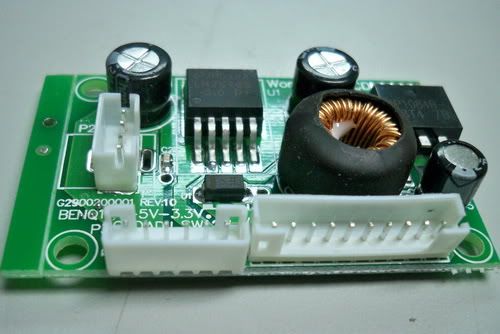
This E-Bay special is pretty cheap and has free shipping. It seems like it would do the job just fine and would not need to be converted to not being a plug in for a breadboard. But would a LED power module work for the above mentioned video transmitter? Voltage is spot on to what I need but I'm unsure of the LED part of the description...
#3
You tell Me... If all these finds are junk and you use something else, please let me know. Also if you have a design I could build that would work too.
That there is the culmination of 30 months of off & on, hard work. The 1st stable hover of the Marcy 1 monocopter, under computer control. The last items were getting the takeoff as stable as possible, getting the altitude as stable as possible, aligning the azimuth as close to the camera angle as possible, & trying many PID values. Not only does it take off autonomously, but it can't be flown manually at all in this space.
There was a time when just a takeoff that stable was considered impossible, but we made it happen. Then there was a time when controlling the altitude of such a slowly spinning rotor was considered impossible, but we got it controlled. Finally, horizontal position was not considered controllable, but we managed to control it.
It's still a very unstable aircraft & this is the smallest space it could possibly fly in. The instability seems to be mainly from air turbulence building up from its own downwash, but there's just enough control with exactly the right calibration values to keep it in the air.
A descent was commanded near the end & the motor was killed, because 2 minutes is the point where it overheats. The video is from the machine vision camera.
Then of course, there's the Feigao.
Always looking for punishment, we got another Feigao. This was 5250kV, 12 x 22mm. It may have been the same motor in the same store 3 years ago, but which we avoided because either the kV wasn't the highest or it was more expensive. Now, it was $32.50.
Feigao no longer sells motors directly. They're now sold as Electrifly Ammo & much lower kV ratings.
Ready to destroy some propellers.
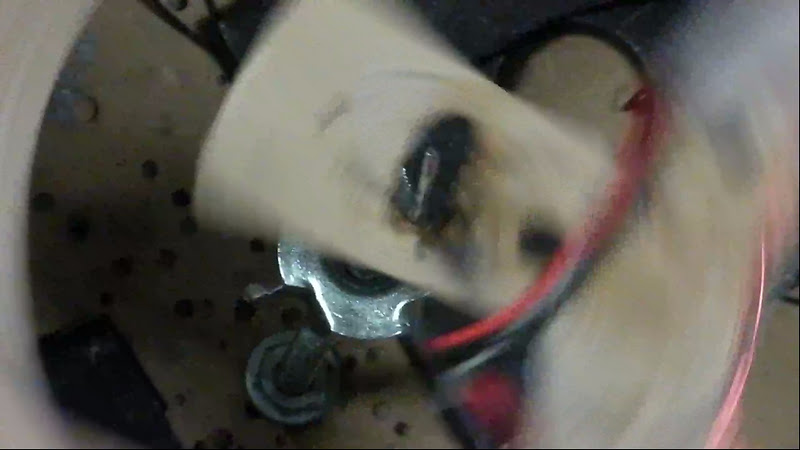
Then we discovered the wires were not inserted in the case for stress relief, but merely hanging off the magnet wire.
The previous one was 5400kV & slightly heavier.
Definitely changes the battery position. Buying the same motor from the same store definitely brings us back to the beginning of M.M..
The 1st problem was the fact that the prop adapter only tightens when spinning counter clockwise. To act like a pusher, it needed to spin clockwise, loosening the nut. We have threadlock poured in a small reservoir on the nut. This has actually been holding.
Some ideas for balancing it have come to mind. Finding the center of wing pressure is the bigger challenge.
Zip tie landing gear is the new thing.
Finally, there were experiments in more stable takeoffs. The takeoff needed to be vertical for anything else to work. Nothing takes off vertically. Everything wants to kick to the side.
The best weapon was a very large hole & a longer spindle. The large hole would let it settle wherever the small changes in the center of gravity were. The longer spindle would keep it stationary after flight speed was reached.
High speed video showed it didn't settle on the center of gravity, but got pulled to whatever edge the COG was closer to. Even if the COG was in the middle of the hole, it always pulled to the nearest edge with enough force to move the spindle.
No idea why this was happening.
Attention turned to the spindle. Now we have flexing going all the way to the base. The closer it gets to lifting off, the more compliance the rod gives. Theoretically, it should be spinning closer to its COG than ever.
That gave a pretty straight takeoff, compared to before. Some gain tweeking got the altitude a lot more stable. There is still an undershoot right after takeoff, but after that, it's very stable. There was a time on the golf course, when we thought we would never get the takeoff profile tight enough to fit indoors.
Trying to control attitude in flight seems hopeless. After takeoff, there is too much variation in camera angle to get a useful orientation. Still pretty insane stability, compared to years ago.
For the 1st time in 3 years, we got something we ordered from hobbyking, using the cheap shipping. It took 3 weeks. These ended up 7 grams heavier than our lightest 800mAh & slightly bigger than the old battery & we only have 2 Dean connectors.
A few sparks & a whiff of ozone later.
The Turnigies were 7 grams heavier, but the Gaui we had since 2009, before Gaui ever sold a quad copter, is 8 grams heavier than our lightest 800mAh.
The Turnigies came at 1/2 charge.
After proving hovering, Marcy 1 got a major overhaul.
It begins with a new wing.
The electronics are shifted to the end & a 3 gram heat sink is installed.
After all that weight shifting, it was more unstable than before.
It could be the center of wing pressure or the angle of attack.
Anyways, also noticed this motor wasn't powerful enough to do the job. It had enough kV but not enough wattage. The successful tests were at 0.5m, but it couldn't sustain 1m in altitude. As it heated up, its power decreased until the cyclic had reduced effectiveness. That seemed to cause it to lose control.
2 minute flights are probably good enough. A smaller battery might help. Wouldn't know what to do with the last 6 batteries.
$16 of gas, $2 of taxes, & $22 of batteries later,
When the more energy dense motor is no longer made & you don't have enough room to fly a bigger wing, a smaller battery is the only choice.
They were both unbalanced. 1 was slightly puffed. 1 cell had 2.8V. Another cell had 0V. Still using a junk charger from 6 years ago, we had to charge 1 cell at a time, start it charging 2 cells, then quickly switch it to the low cell. They advertize a 5C charging rate & we've had these up to 2C charging.
More autonomous flights proved the battery was a success. It reduced the coning angle & increased stability. Here we have 1 flight at .5 meters & 1 flight at 1 meter at 2x speed. The motor overheated at around 3 minutes, causing a rapid descent in the 2nd flight.
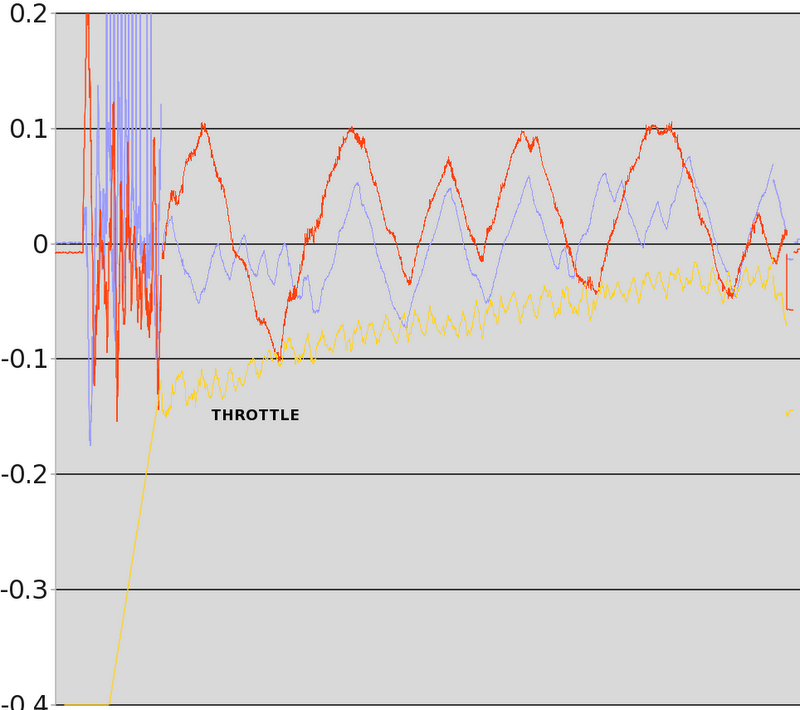
Telemetry from the flight in ground effect shows throttle increasing but not getting out of control.
In the flight out of ground effect, throttle got exponential near the end & control authority decreased as the motor overheated.
Posted by Gareth Rens on January 21, 2012 at 4:00am
Some interesting videos of my morning flights with the latest firmware and APM2.
Dont forget to watch the last video ;)
1st loiter
Arducopter, now with REAL chicken sound effects... Loiter worked quite well considering the drift issue... It only started to drift after a while. Seems like the more stick input you give, the worse the drift gets.]
2nd loiter It went better, I tried to stay away from using too much stick.
1st alt hold. Went beautifully, as good as the sonar! Still the drift issue in stabilize.
low level alt hold Pool noodles rock!
Karlas first attempt I suppose I should fix the drift issue before I let my GF fly it... Fortunately I was controlling the throttle and trying to film. Funny as hell! It landed on the roof...
SUMMARY: Loiter and Alt Hold work fine. But the drift issue makes it un-flyable! The only thing that fixes the drift issue is resetting the board. Then it works for 20-30s and then cant fly it anymore. Running the level command and in-flight leveling doesnt do sh*t.
Very impressive design and what looks like top-quality components. [UPDATE: It appears to be a stock Xaircraft frame that costs $160. Thanks to the commenters for catching this]. You can back the project here ($999 for the copter, $1,499 for the full deal with APM 2)
Posted by Adam Rivera on January 20, 2012 at 6:30pm
DISCLAIMER: This could be dangerous and might crash your copter.
OK! I made some new changes to the autotuning algorithm and I have tested it again in the simulator. I think this is ready for some real world testing from some VERY BRAVE users, or some simulation testing. Unfortunately I do not own a quad and my octo is out of commission until Tuesday, or I would be testing this right now outside.
First, here is what is new:
1. The amount of change applied to the P gain scales down with each iteration. This allows for quicker acquisition and better resolution of your Pretty Good Gain
2. If the tuning logic moved the P gain in the wrong direction it will revert to the best P gain that had been found and use that as the new launching point which should save some iterations
How to use it:
1. Replace the files in your ArduCopter 2.2b2 code base with the files that I have included in the .zip.
2. Upload the code to your board and test in the simulator so that you can get a feel for how it works (follow the same steps below for setup starting at step 5)
3. Update the config file to disable the HIL setting or change your frame type, etc...
4. Re-upload the code for live flight IF YOU DARE
5. Connect the APM to the Mission Planner.
6. Go to the configuration tab and manually set the CH7_OPTION to 8 as seen below and click "Write Params"
7. Set your Integral (I) gains for pitch and roll to zero and click "Write Params"
8. Bring the copter to a hover and flip CH7 to the high position to activate the auto tuning mode
9. Roll to the right or left and quickly return the stick to the center position. (Repeat this step at least 5 times)
10. Deactivate auto tuning mode by flipping CH7 to the low position
11. Reactivate auto tuning mode by flipping CH7 to the high position
12. Pitch the copter forward or back and quickly return the stick to the center position. (Repeat this step at least 5 times)
13. Deactivate auto tuning mode by flipping CH7 to the low position
14. Go to the configuration tab of the Mission planner and click "Refresh Params" to see your new tuned P gains
15. Write those values down.
The idea of steps 9 and 12 is to introduce a wobble and let the copter try to even itself out. Don't go too aggressive with your pitch or roll... again its just to introduce a disturbance.
My videos are in 1080p so that you will be able to read whats on the screen.
Questions, comments, discussion is welcome and encouraged!
FPV is the greatest way to discover places while you're on vacation. In the next few weeks and months TBS is going to present a couple of vacation videos ... here's the first from the Maldives, piloted by RiSCyD.
Posted by Gary Mortimer on January 19, 2012 at 10:19pm
If you have quite a wedge of loose change down the back of the sofa this might be a fun thing to purchase!
Those long evenings hiding in a tree now in colour!
The Tau CNV color and monochrome cameras deliver near starlight-level imaging and are designed for security, military EO systems, hyperspectral imaging, and traffic monitoring applications. The CNV operates on less than 4 Watts of power, weighs less than 175 grams, and takes up approximately 1502 cm of volume.
Posted by Adam Rivera on January 19, 2012 at 9:13pm
Hello all,
First, THIS IS EXPERIMENTAL FOR SIMULATION ONLY. Video coming shortly of me using it in the simulator.
I have a functional first attempt at automatic P gain tuning. I'm calling it Pretty Good Gains (pun intended). There is definitely room for improvement, but here is how it works:
PID controllers usually end up with an output graph that looks something like this (from wikipedia):
As you can see by the above graph the most well tuned P gain value in this controller is 2. Why? Because it arrives at its target value the fastest with the least amount of overshoot and oscillation. One can see this in practice when flying a multi-copter and the PIDs are too high producing an oscillation. I have read a lot of different PID tuning strategies looking for something that I could replicate in code. I came across something called the Good Gain Method. Essentially this method of tuning requires the user to set the Integral and Derivative gains to zero and first focus on the P gain. Adjust the P gain until the least amount of oscillation is seen with an acceptable arrival time at the target value. If the P value is too low, the curve will take too long to get to the target and if the P value is too high you will see the more violent oscillations.
How do we do this in code? Well, first I require the user to input a disturbance into the system (ie. pitch right) and then wait for the user's input to return to zero (center stick). Now we have our starting point (the disturbance) and our target (zero pitch, or stable hover). As the copter attempts to return to a stable hover the error values follow a path similar to the curve above. As this is happening I measure the distance between the first peak and the first valley of that curve and how long it took to produce that peak and valley. Now we have our starting point. When another disturbance is introduced we can compare its peak/valley to the previous oscillation and decide which direction to move the P gain. Once that is done enough times, the P value is tuned.
Right now I move the P gain value in increments of 10%, but I can see changing that to adapt to the degree of the oscillation with increasing granularity as the P gain improves. I have tested this in the HIL simulator and it seems to work well. It works best if you set the P values a bit too high and let the auto-tune lower it.
I am attaching a zip of the files I modified. Please give me feedback and discuss my method. Again, Pretty Good Gains means that this isn't perfect. It also doesn't address the Integral gain... but I have plans for that too.
A professor at MIT developed an equation to determine the fastest theoretical air-speed for obstacle avoidance.
From Science Blog: "Emilio Frazzoli, an associate professor of aeronautics and astronautics at MIT, says knowing how fast to fly can help engineers program unmanned aerial vehicles (UAVs) to fly at high speeds through cluttered environments such as forests and urban canyons.
Most UAVs today fly at relatively slow speeds, particularly if navigating around obstacles. That’s mainly by design: Engineers program a drone to fly just fast enough to be able to stop within the field of view of its sensors.
Frazzoli and PhD student Sertac Karaman developed mathematical models of various forest densities, calculating the maximum speed possible in each obstacle-filled environment.
The team’s work establishes a theoretical speed limit for any given obstacle-filled environment. For UAVs, this means that no matter how good robots get at sensing and reacting to their environments, there will always be a maximum speed they will need to observe to ensure survival."
Notably the main processor has been upgraded to an ATmega2560 giving 8 times the size of both flash and ram, amongst other things :)
Also there is a graphical LCD that should provide a larger, more user friendly display.
The extra serial ports (4 in total) will enable future expansions as and when required. One is dedicated to the USB for loading software as well as potentially being used to allow a computer to share the installed Xbee.
If you don’t want to use an Xbee, or want to use more than one, that’s fine- three of the serial ports are broken out to the left of the board. These could also be used for adding a GPS unit, or perhaps a bluetooth to pc link for example.
Also broken out is the i2c port, so you can link it up to a magnetometer if need be (could make for simpler antenna tracking alignment)
A micro SD card will allow data logging, parameter saving, mission uploading and hopefully more!
The rotary encoder (like a radio’s jog dial) should help with faster navigation / value editing. The buttons are also on a separate PCB such that they can be mounted flush with the display or separately subject to enclosure constraints. (Also this means I can change the layout of the buttons)
The battery supply and Xbee RSSI are connected to give health information on voltage and telemetry link signal strength. Additional analog pins are also broken out for monitoring external sensors.
The PCB has been sized to match the dimensions of the LCD, giving a neat install that can be attached with screws and spacers. All of the components are mounted on the inside as well, such that the total unit size is minimised.
As with my Uno version, I use a single cell LiPo for the battery source, with an efficient step up regulator for the 5v supply. There’s also inbuilt USB charging.
The antenna tracking will be achieved by the two servo headers on the right hand side of the board. These also have a solder jumper for selecting off-board power in case heavy duty servos are to be used.
Please let me know what you think!
If you want to see more, here's a video of me showing it off:
This is my first blog here so just few words about me: I’m an electronic engineer, I'm from Romania and my hobby is obvious.
By more than one year now, I spent lot of time working with Atmel XMEGA family. My first autopilot with XMEGA 128A1 had external 16bit ADC (ADS8344) because at that time, internal 12bit ADC and DMA were still unclear to me. MPX pressure sensors for air speed and altitude, HMC5843 compass, ADXRS610 gyros and LIS344 accelerometer.
This video is during flight testing of above mini-quattro:
Same AP I used for one Hexa:
Mean time, getting more familiar with XMEGA, I decided to go forward. The second AP I made, had different design: separate PCB for sensors. Dedicated XMEGA128A1 PCB for sensors and dedicated XMEGA128A1 PCB for PID and GPS navigation. This way I wanted to avoid MCU speed limitations during testing of different sensor filters/navigation algorithms. The AP is made of 3 PCB's.
From top to bottom:
-Analogical PCB is using LIS344 accelerometer, IDG500/ISZ500 gyros, HMC5843 compass and BMP085 absolute pressure sensors. The PCB have 94% of area covered by ground plane. Dedicated reference low noise IC with RLC voltage filter. All gyros and accelerometers outputs passing through 2nd order active Sallen Key low pass filter. Cut off freq. is 75Hz for gyros and 10Hz for accelerometers.
-Next PCB has XMEGA128A1 at 40Mhz (40MIPS). Separate power supplies for analogical and digital sides, each power supply IC having its own RLC voltage filter at input. To keep conversion speed as high as possible, gyros are connected to ADCA and accelerometers to ADCB. Both ADCA and ADCB can be triggered practically in the same time, each of ADCA and ADCB having 4 channels and because this is a pipeline ADC (see XMEGA manual), 8 separated inputs can be sampled and converted in almost same time. ADC’s are running at 1.25MHz. This configuration will run 7 state EKF at 350Hz for time update and 300Hz for measurement update. Complementary filter with integer numbers is running at 2600Hz.
One I2C channel is used for HMC5843 and one hardware UART for serial communication with navigation MCU. Serial com is at 500Kb/s and is using DMA transfer triggered at 2.5KHz. Several pins are directly connected to navigation MCU and used as I/O flags in program. UART for PC comm. with DMA transfer (for logs and firmware update). There is also analogical input for temperature sensor from IDG500 (for temperature compensation).
-Last PCB is using XMEGA128A1 at 40MHz (40MIPS), having also separate power supplies for analogical and digital sides with separate RLC voltage filters. All of the MCU’s and sensors supply IC’s are feed by 6.5V switching mode power supply (TSR 1-2465). This way, dissipated power is kept at minimum. There is another 5V switching mode power supply (TSR 1-2450) used for GPS, R/C receiver, XBEE, SONAR and two small servos for camera . All I/O are using dedicated hardware:
- battery voltage monitoring
- 8 PPM R/C inputs
- 8 PWM outputs (max 495Hz) better than 14bit resolution
- 2 PWM outputs for servos (camera control)
- I2C input for BMP085 from analogical card
- UART for PC comm. with DMA transfer (for logging and firmware update)
- UART with DMA transfer for GPS with activity LED
- UART with DMA transfer for XBEE with activity LED
-UART with DMA transfer for SONAR with activity LED
- Analogical 12bit input for SONAR
- 8 digital outputs at 500mA/each (ULN2803) for Buzzer, external LED’s and payload trigger
-2 ADC inputs 12bit resolution
-4 general purpose I/O used also as additional UART, PWM I/O or I2C
- one red LED for different status signalization
Below is one test flight with one oktokopter ( I had to buy the frame because at that time I did not had yet my own CNC machine ):
Last AP with XMEGA I made, is one PCB only. I wanted to make one multicopter where all electronic parts are kept between the two carbon fiber plates which are fixing the ALU arms and all cables to pass inside ALU arms. This way copter is looking simpler, there is no need for canopy and electronic circuits are well protected. MCU used is XMEGA128A1 at 40MHz.
Same ADC configuration was used as previous AP, but with simple 1st order low pass RC filter for gyros and accelerometers; LIS344 accelerometer, IDG500/ISZ500 gyros, HMC5843 compass and BMP085 abs. press. sensor. Analogical input for temperature sensor from ISZ500 (for temperature compensation). Following are the I/O’s dedicated hardware:
- battery voltage monitoring
- 6 PPM R/C inputs
- 8 PWM outputs (max 495Hz) better than 14bit resolution
- 2 PWM outputs for servos (camera control)
- separate I2C channels for BMP085 and HMC5843
- UART for PC comm. with DMA transfer (for logging and firmware update)
- UART with DMA transfer for GPS with activity LED
- UART with DMA transfer for XBEE
-UART with DMA transfer for SONAR
-2 general purpose I/O used also as additional UART, PWM I/O
Following are two BLDC ESC’s made with XMEGA16A4 at 40Mhz. First ESC I made did not had current reading but for second one, 0.005Ohm shunt was added together with smaller size MOS transistors.
First type ESC:
The pictures below are for type2 ESC with shunt resistor; Motor and battery cables are in same side making easier connection inside frame:
Features:
The ESC is using special hardware output for BLDC motor control from XMEGA (with AWEX extension).
The PWM freq. is 20KHz with 1000 steps between 0 and max PWM. One ADC channel running in free mode at 1.25Mhz with DMA transfer configured as differential input is used to read the current passing the shunt resistor. By reading the current have few advantages: improved starting up, limit of the maximum desired current, checking integrity of MOS transistors/motor coil and cable connection between motor and ESC during initializing at power up .
Command to the ESC can be send by any of PPM input, I2C or UART .
Two LED’s (red and blue) for error/run signalization.
Rotor stall detection.
Few pictures of the copter with all electronic parts "inside" :
Here is one video taken during initial PID testings. The ESC’s are of type2 with XMEGA16A4:
Work in progress is for one Hexa Y frame also with all electronic cards between the two CFK plates:
Last video is with one 3m wingspan airplane during first flight test. Engine used is ZENOAH 68cc. When Spring will be back, will start testing this platform with AP and keep you posted.
Here a video about the HIL tests of the firmware ArduCopter v2.2 b2xp2 (with JLN updates) with an Helicopter in H1 mode (Raptor 30 type) on the AeroSIM-RC simulator.
The tested features are:
- STABILIZE mode, - LOITER mode (GPS position Hold), - RTL (Return To Launch), - AUTO mode (GPS autonomous navigation), - AUTO TAKE-OFF, - AUTO LANDING.
Tested with AeroSIM-RC v3.81 and an ArduMega 2560 (APM1) through the APM mission planner v1.1.20.
This is an alpha version of the firmware and only for explorers and testers....
Transmitter: Turnigy 9x, Receiver: Turnigy 9x8Cv2. Helicopter model simulation (type Raptor 30) with 1 roll servo, 1 pitch servo, 1 cyclic servo (type H1).
Posted by Gareth Rens on January 18, 2012 at 11:00am
I finally worked up the balls to fly the thing! Im quite impressed that it actually flew and didnt just explode on the spot after arming the motors ;)
A little wobbly, but thats more me and the shaking than anything else. Slight drifting, however I havent done the whole in flight leveling thing.
Firmware 2.2b2 Octa. Default PIDS. So need to tune them! Any Octo guys have some pid suggestions? (What should I change?) Im definitely looking for sluggish movement for taking photos/videos. I dont need any aerobatics.
As far as power goes, the whole time, i wasnt using more than a 1/4 throttle, even for lift off. It did bob up and down a bit, thats also coz my TX throttle is a little stiff...
Yaw was perfect :)
All in all, it was a successful test flight! Especially since the last thing i built and flew was the arducopter. Going from something that weighs 1.5kg with +-3kg of thrust. To a MONSTER that weighs 4.7kgs with +-20kgs of thrust, is quite intimidating to say the least!
This is definitely a testiment to my engenuity, and most of all an absolutely SUPERB autopilot!
DISCLAIMER: I hope I do not bend the forum rules too much by this blog post and would hate to offend the community by starting the discussion of a (at least marginally) political topic. However, since in the past also UAV regulatory developments and issues that relate to the open-source community have been discussed, and since I believe this topic is highly relevant to the diydrones community, I decided to go ahead.
Those of you who have been visiting wikipedia, google, or some of the other sites that participate in the SOPA/PIPA blackout today may have noticed that parts of the private and public web communities have decided to virtually demonstrate against these (sets?) of law proposals. I myself, being located inside Europe, don't think I can completely follow the legislative process and the actual implications of SOPA/PIPA. However, it seems obvious to me that this topic is very relevant to diydrones as a site of open information exchange. I would like to raise awareness here and ask those who actually are located in the US and can influence the vote by contacting their representatives to please inform themselves and consider (as google's picture says) to take action. Please check out:
It would seem over time this little community is picking up in notoriety. This is awesome everyone and the growing numbers and increased projects and creativeness show what a truly unique community we have here at DIYDrones. Keep it up and I am sure that we will continue to gather more press. The link to the article can be found at:
Unmanned Aerial Vehicles: coming soon to a sky near you
The last decade of global conflict has seen the dawning of the age of the robot plane. Unmanned Aerial Vehicles (UAVs) have been around for decades, but today they're ubiquitous war machines with unmatched endurance and lethal combat capabilities. Find out more about these increasingly high-tech pilotless aircraft.
Drones were developed in the early days of aviation, and were used almost exclusively as moving targets for training exercises. Serious development of controllable unmanned aircraft in the 1960s lead to extensive use in Vietnam. The AQM-34 Ryan Firebee, for example, flew over 34,000 missions – primarily used for surveillance, they could also detect enemy anti-aircraft missile installations. Once launched, they were controlled remotely by a "pilot" in a DC-130 flying nearby. The Lockheed D-21 UAV, which looks like one of the engines from the Lockheed SR-71 Blackbird detached and given autonomy, holds the record as the fastest UAV, topping Mach 4. However, it never made it beyond the testing phase (photo: a D-21 piggybacks on top of an SR-71).
The military UAVs familiar today trace their lineage to aircraft developed in the 1980s. Israel was at the forefront of UAV design, using several light, remotely controlled aircraft to great success in the 1982 Lebanon War. The first modern UAVs used by the U.S. military were Israeli Pioneers purchased in the early 90s.
Better remote control and camera technology allowed UAVs to take on more involved reconnaissance roles. The Israeli light UAVs also focused on light, efficient designs, emphasizing one of the UAV's most important abilities – incredible in-air endurance. Today's UAVs can remain on-mission for 30 to 40 hours, far beyond the capabilities of any human crew. Research into mid-air refueling of UAVs and ultra-efficient solar-powered UAVs could extend that range close to infinity, limited primarily by maintenance needs.
The most well-known U.S. UAV is the Predator, designed and built by General Atomics Aeronautical. The Predator is typical of UAVS in that is uses a relatively simple design that allows simple field maintenance and high reliability. For instance, the 4-cylinder turbocharged engine that powers a Predator is similar to those used in snowmobiles, and the alternator that provides most electrical power would be familiar to the average garage mechanic.
One notable characteristic of current generation UAVs is the "cockpit" bulge, a featureless dome where the pilot would sit in a conventional aircraft. This dome houses an array of antennas that allow control and sensory signals to move back and forth between the plane and the controller. The largest is a satellite communications dish – this dish's size and placement are the main reasons UAVs are shaped as they are.
The U.S. military was not content to merely identify targets with their UAVs – they wanted to blow them up, too. That's why the Predator (and its variants the Gray Eagle and the Avenger) can be armed with Hellfire missiles. In this configuration, they are not used as front line warfighting machines – against a plane with a human pilot, a UAV will lose every time. They're more like high-tech assassination weapons. In that capacity, the U.S. has used them to kill high-level al-Qaeda operatives like Anwar al-Awlaki. The drawback of this approach is that the imprecision of the Hellfire has caused numerous civilian casualties (the exact number is perpetually in dispute). In the future, UAVs may be armed with smaller, more precise armaments such as the Griffin or Spike missiles.
You might expect that future UAV development points toward fully autonomous planes. There is certainly work being done in this area. Today's UAVs have some forms of autonomy – flight control surfaces may be fully automated, with the controller simply issuing a series of GPS waypoints as the on-board computer handles the details. It's important to note that UAV autonomy research comes mainly from the control angle. That is, programs are written with sensor input/decision trees for the plane to follow. Actual artificial intelligence is not a major aspect of UAV research. But overall, autonomy is not a priority right now. It's a cost-benefit issue – the cost of developing effective autonomous UAVs is undercut by the cost of training human controllers, and there's no great necessity for planes that fly themselves. The political and social ramifications of fully autonomous planes armed with missiles also loom large within the Pentagon.
If not toward autonomy, where is UAV development heading? Toward robustness and ubiquity. Next-generation UAVs will be larger, allowing them to carry more payload. They will also have more powerful engines – the Avenger variant of the Predator has jet engines – allowing for faster response time. Proliferation of the technology means non-NATO countries will have their own UAVs. Russia has a relatively successful UAV development program, and manufacturers are selling designs like the Hermes 900 to South American countries. Pilotless aircraft will soon be part of a every belligerent international conflict.
That ubiquity can be worrisome, though, when it takes place back home. For now, UAVs used in domestic situations in the U.S. have been smaller, "man-portable" units used for search and rescue, fire suppression and surveillance. NASA uses a Predator variant called the Ikhana (top photo) for civilian research and development. What happens when the cost comes down and every police department in the country has a fleet of UAVs constantly in the air? Current privacy laws are probably not going to answer all the questions such a situation will bring up.
The counterpoint to this UAV-powered panopticon is that it is becoming increasingly easy for the average citizen to create and operate a UAV. The website DIYDrones offers access to an open source project called ArduPilot. ArduPilot is a computer that installs into a plane (typically a radio-controlled plane), then runs the ArduPlane autopilot software, transforming it into a UAV. Civilians even created a UAV to observe police activities during Occupy protests – the OccuCopter is a quad-rotor UAV that can be controlled via iPhone and streams video live to the internet.
Posted by Gent Armedo on January 17, 2012 at 11:00pm
ArduPilot Mega 2.0, the newest autopilot from 3D Robotics/ DIY Drones is mounted in my trusty Multiplex Fun Cub.
The code is 2.27 uploaded via the latest ArduPilot Mega Planner.
Tested were Manual, Stabilized and RTL (Return To Launch) modes. The Fun Cub's Surface Controls were twitchy because I did not put some expo on the ailerons and elevator.
On RTL mode, the Fun Cub was getting battered and shoved by winds on altitude, hence I cannot say if the loiter radius was right. I did not wait for a couple more minutes for the GPS satellites to have a solid fix so on RTL mode, so the Fun Cub loitered a little bit off from the home position; it does not matter because the plane is within my vicinity. Overall, the APM 2.0 performed great in a smaller and lighter form factor.
About once a year we post our software roadmap for the next 12 months. Last year, we promised we would take ArduPlane and ArduCopter into their 2.x generation, with full two-way MAVLink control and a full featured ground station and setup process. The 2.x generations of the code were intended to give APM-based vehicles all the features of professional-quality autopilots at a tiny fraction of the cost. With a huge amount of effort from the whole dev team, which now numbers nearly a hundred people across its many projects, we've completed that. Yay!
The 2.x generations of ArduPlane and ArduCopter are now being flown by thousands of people, making the APM platform the most popular open source autopilot in the world. With the introduction of APM 2 (above), with vastly improved sensors, lower price and fully-assembled delivery, this growth looks likely to accelerate. After a shipment of 150 boards to early-adopters last month, full production of APM 2 will resume in early Feb. The current 2.x codebases already fully support the new APM 2 boards.
So at this point the 2.x codebases are essentially feature complete, and we can move on to 3.x. (That said, the 2.x software will see continued updates to improve performance and reliability. In particular the traditional heli version of ArduCopter is a couple versions behind the more mature multicopter code, and will continue to evolve over the next few months--helis are hard!).
As the dev teams focus on the 3.x code, you should see far fewer public code updates for a period of about three months (until April 2012). Lots of work will be going on behind the scenes in the Git repositories, but we will not be rolling out public releases of new features that risk drowning the team in tech support and documentation demands. Again, we will continue to fix any issues that are identified in the 2.x code and otherwise ensure that it's flying well for everyone, but we won't be adding new features to it during this period.
The 2012 Software Roadmap
The main objective of the 3.x codebases will be a new architecture that emphasizes modularity and portability. This is to help with the following:
Better reliability by making the code easier to understand, debug and maintain
Easier accessibility for new dev team members
Easier portability to new hardware platforms
RTOS compatibility, to prepare for the forthcoming ARM-based versions of APM
Examples of Planned New 3.x Features:
MPU-6000 DMP support.
Inertial dead reckoning drift compensation
Full scriptable camera control on both ArduPlane and ArduCopter, with interactive camera gimbal setup
Auto-trim: sets RC trim points when exiting manual mode
Loss of signal failsafes for GCS link
ArduCopter: Autonomous "follow me/look at me" control with handheld GPS groundstation
ArduCopter: Support for I2C/SPI/CAN motor controllers and forthcoming "smart" motor controller/PDB board
ArduPlane: Support for Flaps with automatic speed dependent deployment
ArduPlane: Servo control loop gains with speed scheduling
ArduPlane: Airspeed nudging from the RC TX in autonomous modes
ArduPlane: Inverted flight mode and scriptable acrobatics
ArduPlane: Sonar flare control
Architecture changes:
Make RTOS support possible:
Eliminate global state in sketches. This is a broad, fundamental change required to effectively use an RTOS.
Modularize sketch code into classes with interfaces. This will improve code comprehension and help enforce communication with messages rather than global state (again, required for RTOS)
Replace loop()-style structures with explicit periodic scheduling. This will increase code comprehension, enforce non-reliance of ordering of loop items (& global state), and make it easier to move to RTOS later.
Eliminate remaining synchronous blocking IO
Coding style:
Rename library class methods and members to meet coding standards
Run automated ‘indent’ script on all source, implement indent bot which fixes whitespace issues checked into repository nightly
Dramatically reduce reliance on preprocessor in sketches: features like HIL & ArduCopter traditional heli will be implemented using standard interfaces rather than source code manipulation
Logging:
Proposal: switch from special dataflash logging packets to MAVLINK 1.0 data
Modularize logging, move to libraries directory
Add SD card support for APM2
-------------------
Join us!
If you'd like to join the dev teams, please read this post on the best ways to do it. (Short form: pick something specific that you'd like to help with and show some familiarity with the code). We're always looking for more programmers, but we're careful about taking time to figure out how to integrate them best and on which project, both for their sake (to have the highest impact soonest) and for the sake of the existing dev team members, who have limited time.
You can always PM me with a request to join the team, and I'll generally start by adding you to the dev team mailllist so you can see how we work and get a feel for where you might fit in best.
A lightweight automatic ground collision avoidance system (Auto GCAS) which depends on a terrain database of the entire world housed in a smart phone is being flight tested by NASA.
The flights follow initial development of the Auto GCAS for U.S. Air Force F-16, F-22 and F-35 fighters, and are aimed at extending use of the safety system to a much broader range of applications from unmanned air vehicles to general aviation aircraft. The system uses precise navigation, performance and digital terrain data to constantly monitor the aircraft’s position relative to known obstacles. Auto-GCAS is designed to intervene as a last resort, automatically recovering an aircraft when it senses that a ground collision is imminent and the pilot is not taking action.
...
Unlike the original Automatic Collision Avoidance Technology (ACAT) Auto GCAS project which was flight tested on an F-16D in 2010, this new test phase is using a 9 ft 8 inch wing span radio-controlled hobby Super Flyin’ King model aircraft. Tests of the Droid (Dryden Remotely Operated Integrated Drone), are being undertaken by NASA Dryden Flight Research Center with support from the Office of the Undersecretary of Defense and the Air Force Flight Test Center.
“We’ve talked about the modular architecture which means you can put it on other aircraft, but we’d only flown it on an F-16. So we asked why not try it out on a very different aircraft,” says Auto-GCAS project manager Mark Skoog. Aside from demonstrating the transition and portability of Auto-GCAS to another platform, the project is also designed to develop and explore performance enhancements such as new escape maneuvers beyond the vertical fly-up used by the F-16 system.

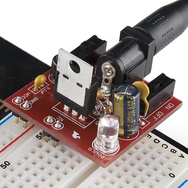 This one is intended to use a walwart in the recommended 7-9v range. It outputs a selectable 5v or 3.3v but forgive the newb-ness, I'm not sure if I HAVE to use a walwart. Wouldn't a 2 or 3 cell lipo do the DC trick just fine?
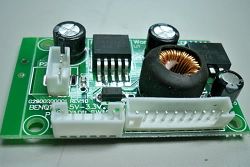 This E-Bay special is pretty cheap and has free shipping. It seems like it would do the job just fine and would not need to be converted to not being a plug in for a breadboard. But would a LED power module work for the above mentioned video transmitter? Voltage is spot on to what I need but I'm unsure of the LED part of the description...







 18


 One notable characteristic of current generation UAVs is the "cockpit" bulge, a featureless dome where the pilot would sit in a conventional aircraft. This dome houses an array of antennas that allow control and sensory signals to move back and forth between the plane and the controller. The largest is a satellite communications dish – this dish's size and placement are the main reasons UAVs are shaped as they are.


